# Light cabin control according to ISO3664:2009 standard

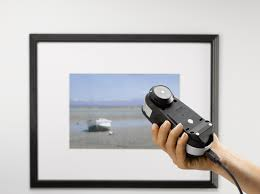
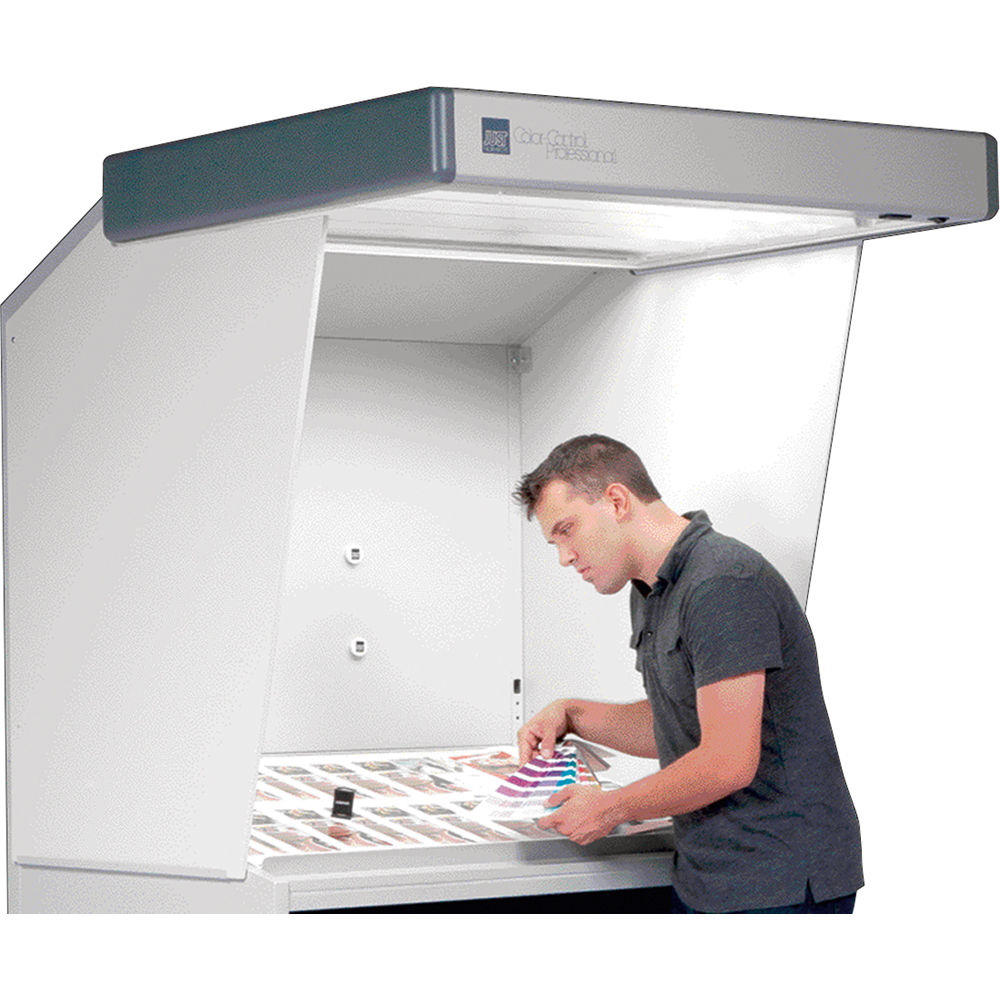
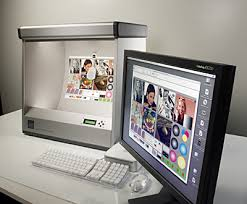
Light Control is a module for controlling light booths according to the ISO3664: 2009 P1 and P2 standard. Its purpose is to produce a control report on the quality of your light in light booths, viewers or booths located at the desks at printers.

[![image-1628602206892.png](https://wiki.coraye.com/uploads/images/gallery/2021-08/scaled-1680-/image-1628602206892.png). ](https://wiki.coraye.com/uploads/images/gallery/2021-08/image-1628602206892.png)[![image-1628602227797.png](https://wiki.coraye.com/uploads/images/gallery/2021-08/scaled-1680-/image-1628602227797.png). ](https://wiki.coraye.com/uploads/images/gallery/2021-08/image-1628602227797.png)[![image-1628606732447.png](https://wiki.coraye.com/uploads/images/gallery/2021-08/scaled-1680-/image-1628606732447.png)](https://wiki.coraye.com/uploads/images/gallery/2021-08/image-1628606732447.png)

##### Prerequisites

This feature can only work with the following spectrophotometers:  
\- XRite Eye One Pro  
\- XRite Eye One Pro ( EFI ES 1000)  
\- XRite Eye One Pro 2 ( EFI ES 2000)  
\- XRite Eye One Pro 3 ( EFI ES 3000) and XRite Eye One Pro3 PLUS

**The "LIGHT CONTROL" module must be enabled**

<p class="callout warning">Important: Make sure your spectrophotometer is connected to a USB port directly on your computer and not to a USB hub  
The XRite I1 Pro are powered via the USB port,.  
If the power supply from the USB port is not sufficient, the spectro will be recognized, but at the time of calibration the software will go into error.</p>

<p class="callout warning">Please note that some OEM XRite I1 Pros cannot measure illuminants.</p>

#### 1) Creating the LCTRL file

First of all, the first step is to create the Light Control file (.lctrl) containing the information associated with the cabin you want to control and the choice of the cabin type P1 or P2.

Click on the "Light Control" icon

[![Light Control 1.png](https://wiki.coraye.com/uploads/images/gallery/2024-08/scaled-1680-/light-control-1.png)](https://wiki.coraye.com/uploads/images/gallery/2024-08/light-control-1.png)
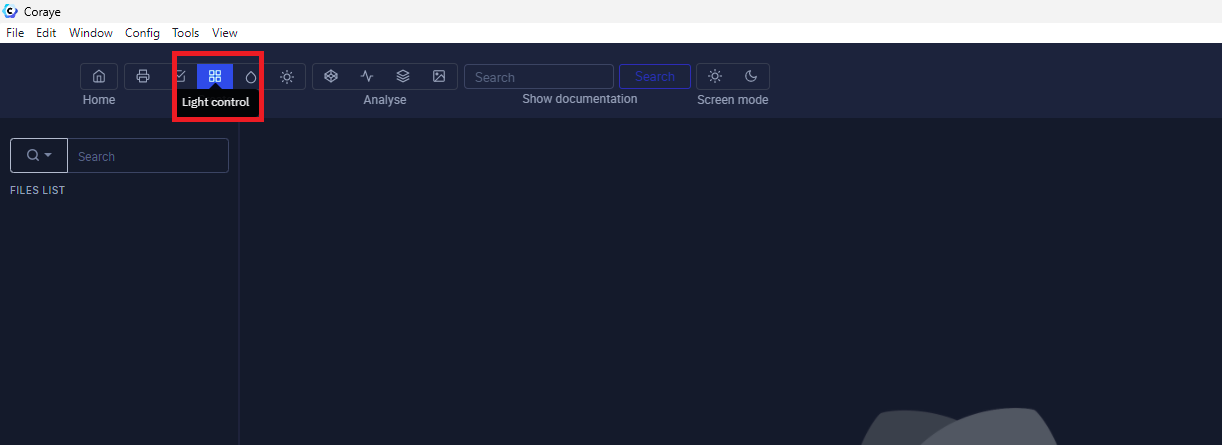
Click on the "Create reference" button

[![Light Control 2.png](https://wiki.coraye.com/uploads/images/gallery/2024-08/scaled-1680-/light-control-2.png)](https://wiki.coraye.com/uploads/images/gallery/2024-08/light-control-2.png)
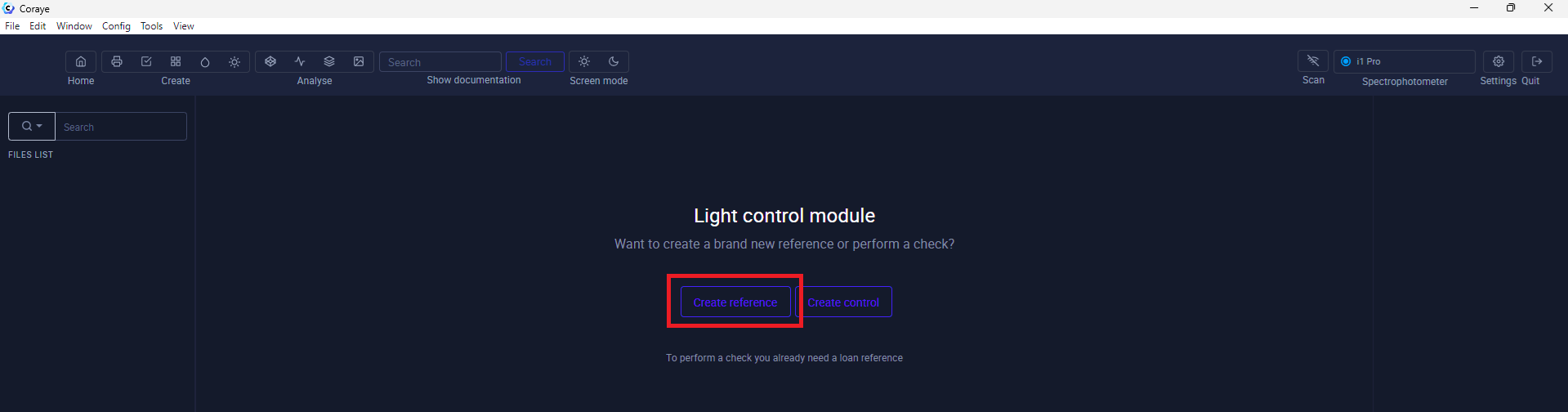
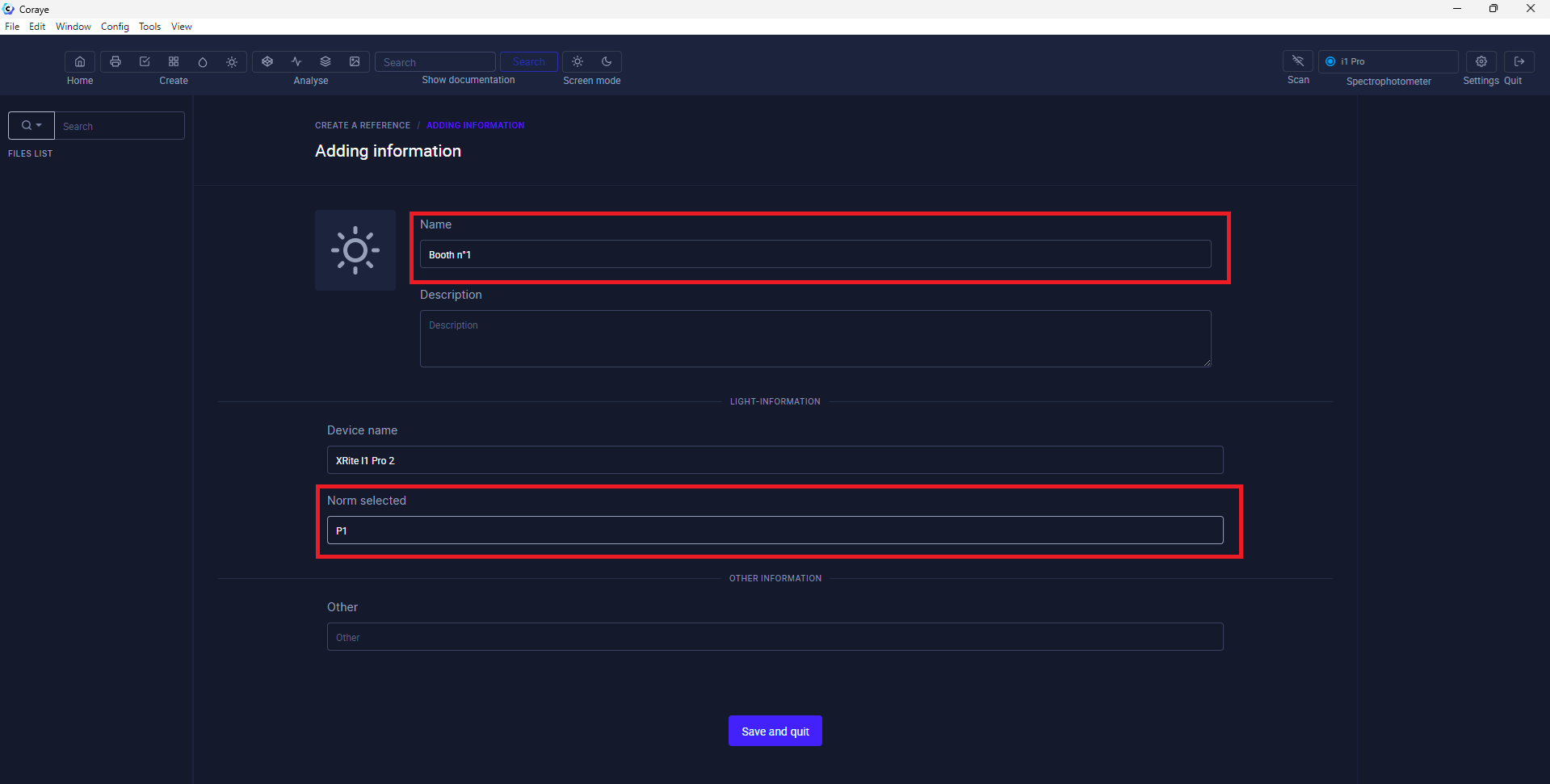
Fill in the fields

In this new window, fill in the "Name" field, then click on the "Save and quit" button  
The other fields are optional, they are only used to add information when you create the measurement reports.  
Define the P1 or P2 standard depending on the type of cabin you want to control.

[![Light Control 3.png](https://wiki.coraye.com/uploads/images/gallery/2024-08/scaled-1680-/light-control-3.png)](https://wiki.coraye.com/uploads/images/gallery/2024-08/light-control-3.png)
The "Light Control" file will appear in the left column.

[![Light Control 4.png](https://wiki.coraye.com/uploads/images/gallery/2024-08/scaled-1680-/light-control-4.png)](https://wiki.coraye.com/uploads/images/gallery/2024-08/light-control-4.png)
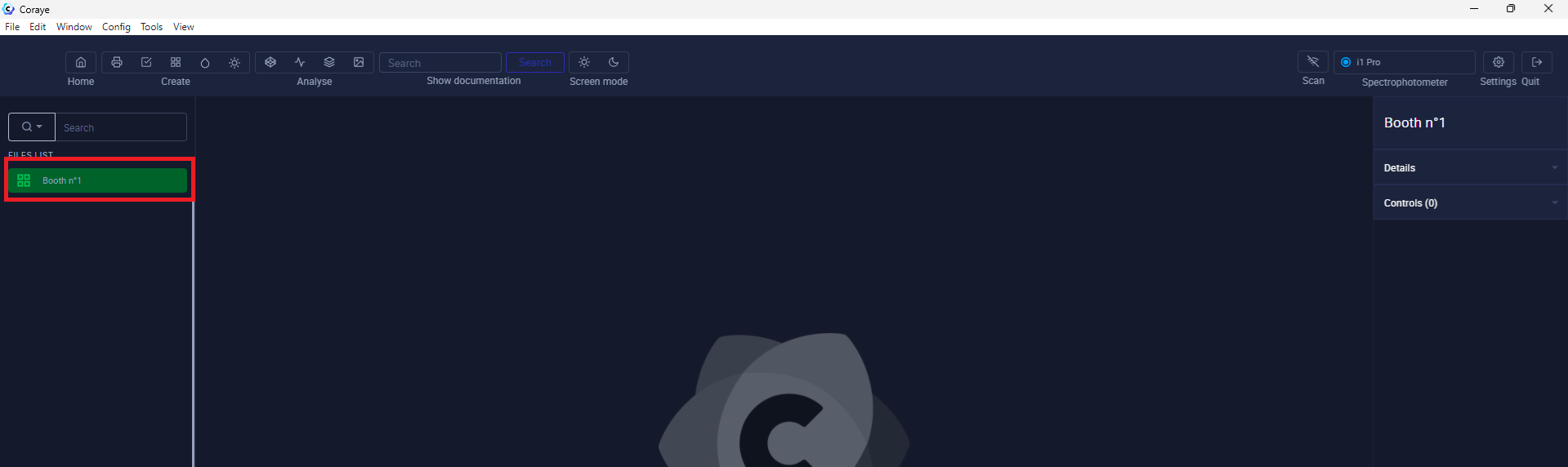
#### 2) Cabin Control

##### Connect your spectrophotometer

Your spectrophotometer name should appear in the top right corner

[![Light Control 6b.png](https://wiki.coraye.com/uploads/images/gallery/2024-09/scaled-1680-/light-control-6b.png)](https://wiki.coraye.com/uploads/images/gallery/2024-09/light-control-6b.png)
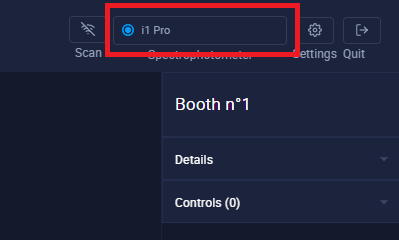
<p class="callout warning">Important: Make sure your spectrophotometer is connected to a USB port directly on your computer and not to a USB hub  
The XRite I1 Pro and Konica Minolta Myiro are powered via the USB port,.  
If the power supply from the USB port is not sufficient, the spectro will be recognized, but at the time of calibration the software will go into error.</p>

##### Let's start controlling your cabin

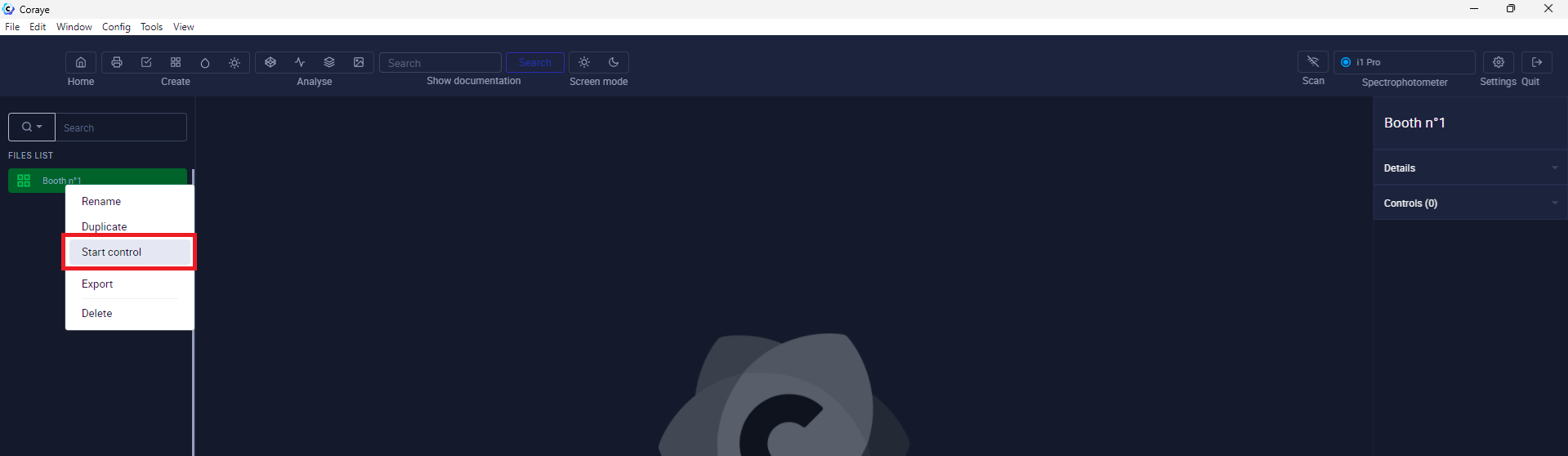
Select the previously created "Light Control" file in the left column, then right-click to select "Start control"

[![Light Control 5.png](https://wiki.coraye.com/uploads/images/gallery/2024-08/scaled-1680-/light-control-5.png)](https://wiki.coraye.com/uploads/images/gallery/2024-08/light-control-5.png)
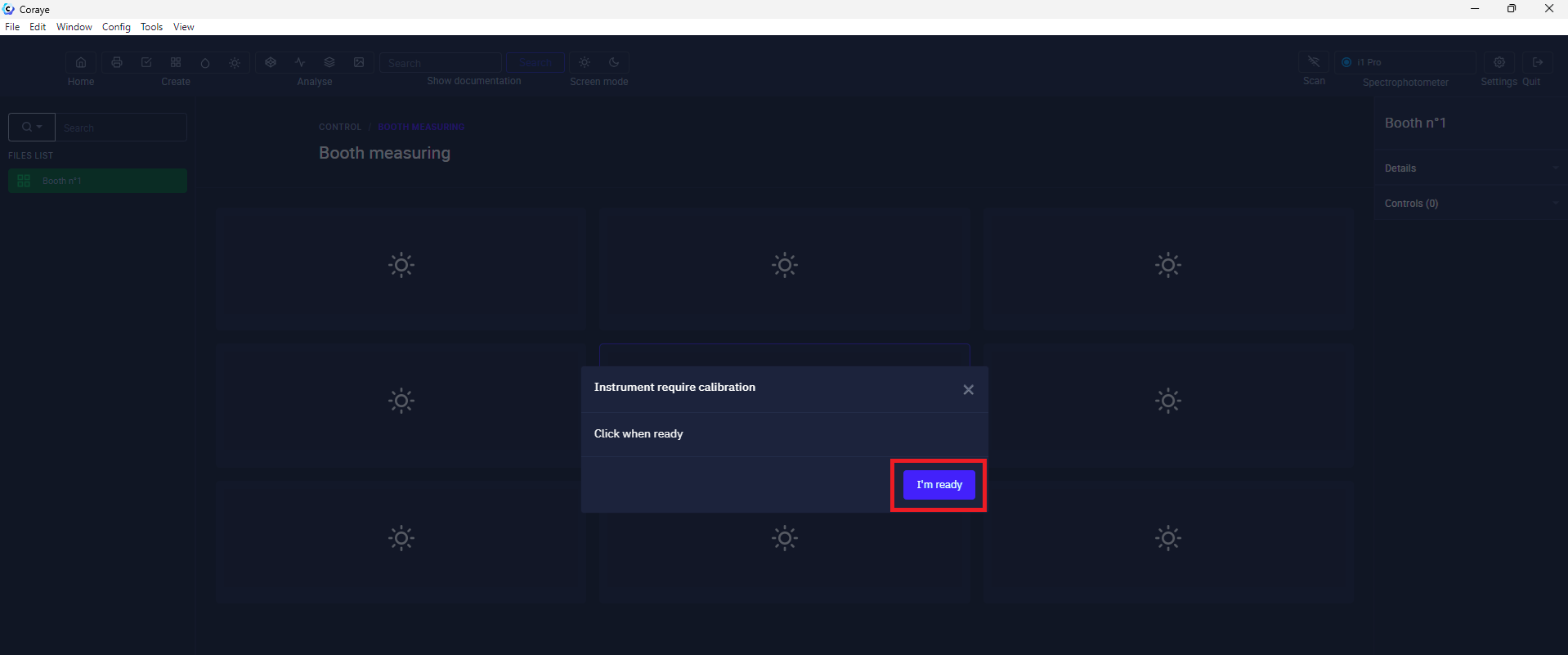
Click on the "I'm ready" button

[![Light Control 6.png](https://wiki.coraye.com/uploads/images/gallery/2024-08/scaled-1680-/light-control-6.png)](https://wiki.coraye.com/uploads/images/gallery/2024-08/light-control-6.png)
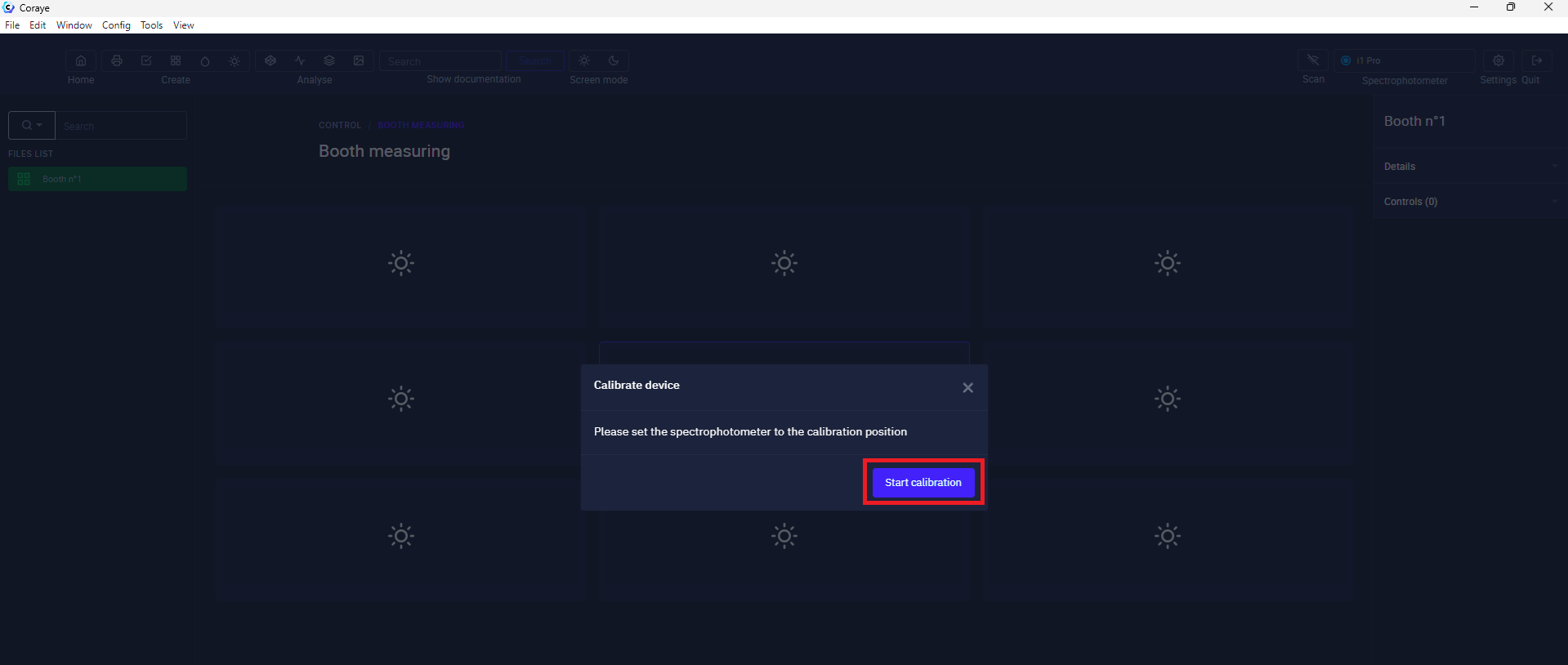
Make sure your spectrophotometer is set to its reference white, then click on "Start calibration"

[![Light Control 7.png](https://wiki.coraye.com/uploads/images/gallery/2024-08/scaled-1680-/light-control-7.png)](https://wiki.coraye.com/uploads/images/gallery/2024-08/light-control-7.png)
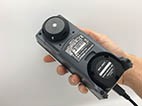
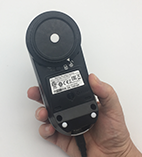
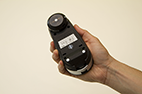
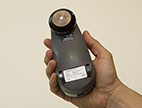
Once calibration is complete, install the light diffusion cap on your spectrophotometer.

<p class="callout warning align-center">Please note, you must use the cap to read the light with  
Konica Minolta MYIRO, XRite Eye One Pro 1, 2, 3 and 3 PLUS.</p>

<table border="1" class="align-center" id="bkmrk-konica-minolta-myiro-0"><tbody><tr><td><span data-slate-fragment="JTdCJTIyb2JqZWN0JTIyJTNBJTIyZG9jdW1lbnQlMjIlMkMlMjJkYXRhJTIyJTNBJTdCJTdEJTJDJTIybm9kZXMlMjIlM0ElNUIlN0IlMjJvYmplY3QlMjIlM0ElMjJibG9jayUyMiUyQyUyMnR5cGUlMjIlM0ElMjJoaW50JTIyJTJDJTIyaXNWb2lkJTIyJTNBZmFsc2UlMkMlMjJkYXRhJTIyJTNBJTdCJTIyc3R5bGUlMjIlM0ElMjJ3YXJuaW5nJTIyJTdEJTJDJTIybm9kZXMlMjIlM0ElNUIlN0IlMjJvYmplY3QlMjIlM0ElMjJibG9jayUyMiUyQyUyMnR5cGUlMjIlM0ElMjJwYXJhZ3JhcGglMjIlMkMlMjJpc1ZvaWQlMjIlM0FmYWxzZSUyQyUyMmRhdGElMjIlM0ElN0IlN0QlMkMlMjJub2RlcyUyMiUzQSU1QiU3QiUyMm9iamVjdCUyMiUzQSUyMnRleHQlMjIlMkMlMjJsZWF2ZXMlMjIlM0ElNUIlN0IlMjJvYmplY3QlMjIlM0ElMjJsZWFmJTIyJTJDJTIydGV4dCUyMiUzQSUyMkF0dGVudGlvbiUyQyUyMHZvdXMlMjBkZXZleiUyMHV0aWxpc2VyJTIwbGUlMjBjYXB1Y2hvbiUyMHBvdXIlMjBsaXJlJTIwbGElMjBsdW1pJUMzJUE4cmUlMjBhdmVjJTIwbGVzJTIwS29uaWNhJTIwTWlub2x0YSUyME1ZSVJPJTIwSTElMjAlMkMlMjBsZXMlMjBYUml0ZSUyMEV5ZSUyME9uZSUyMFBybyUyMDElMkMlMjAyJTIwJTI2JTIwMy4lMjIlMkMlMjJtYXJrcyUyMiUzQSU1QiU1RCU3RCU1RCU3RCU1RCU3RCU1RCU3RCU1RCU3RA==">Konica Minolta MYIRO</span>

</td><td>[![image-1628604011666.jpeg](https://wiki.coraye.com/uploads/images/gallery/2021-08/scaled-1680-/image-1628604011666.jpeg)](https://wiki.coraye.com/uploads/images/gallery/2021-08/image-1628604011666.jpeg)

</td></tr><tr><td><span data-slate-fragment="JTdCJTIyb2JqZWN0JTIyJTNBJTIyZG9jdW1lbnQlMjIlMkMlMjJkYXRhJTIyJTNBJTdCJTdEJTJDJTIybm9kZXMlMjIlM0ElNUIlN0IlMjJvYmplY3QlMjIlM0ElMjJibG9jayUyMiUyQyUyMnR5cGUlMjIlM0ElMjJoaW50JTIyJTJDJTIyaXNWb2lkJTIyJTNBZmFsc2UlMkMlMjJkYXRhJTIyJTNBJTdCJTIyc3R5bGUlMjIlM0ElMjJ3YXJuaW5nJTIyJTdEJTJDJTIybm9kZXMlMjIlM0ElNUIlN0IlMjJvYmplY3QlMjIlM0ElMjJibG9jayUyMiUyQyUyMnR5cGUlMjIlM0ElMjJwYXJhZ3JhcGglMjIlMkMlMjJpc1ZvaWQlMjIlM0FmYWxzZSUyQyUyMmRhdGElMjIlM0ElN0IlN0QlMkMlMjJub2RlcyUyMiUzQSU1QiU3QiUyMm9iamVjdCUyMiUzQSUyMnRleHQlMjIlMkMlMjJsZWF2ZXMlMjIlM0ElNUIlN0IlMjJvYmplY3QlMjIlM0ElMjJsZWFmJTIyJTJDJTIydGV4dCUyMiUzQSUyMkF0dGVudGlvbiUyQyUyMHZvdXMlMjBkZXZleiUyMHV0aWxpc2VyJTIwbGUlMjBjYXB1Y2hvbiUyMHBvdXIlMjBsaXJlJTIwbGElMjBsdW1pJUMzJUE4cmUlMjBhdmVjJTIwbGVzJTIwS29uaWNhJTIwTWlub2x0YSUyME1ZSVJPJTIwSTElMjAlMkMlMjBsZXMlMjBYUml0ZSUyMEV5ZSUyME9uZSUyMFBybyUyMDElMkMlMjAyJTIwJTI2JTIwMy4lMjIlMkMlMjJtYXJrcyUyMiUzQSU1QiU1RCU3RCU1RCU3RCU1RCU3RCU1RCU3RCU1RCU3RA==">XRite Eye One Pro 3</span> &amp; 3 PLUS

</td><td>[![image-1628603927152.png](https://wiki.coraye.com/uploads/images/gallery/2021-08/scaled-1680-/image-1628603927152.png)](https://wiki.coraye.com/uploads/images/gallery/2021-08/image-1628603927152.png)</td></tr><tr><td><span data-slate-fragment="JTdCJTIyb2JqZWN0JTIyJTNBJTIyZG9jdW1lbnQlMjIlMkMlMjJkYXRhJTIyJTNBJTdCJTdEJTJDJTIybm9kZXMlMjIlM0ElNUIlN0IlMjJvYmplY3QlMjIlM0ElMjJibG9jayUyMiUyQyUyMnR5cGUlMjIlM0ElMjJoaW50JTIyJTJDJTIyaXNWb2lkJTIyJTNBZmFsc2UlMkMlMjJkYXRhJTIyJTNBJTdCJTIyc3R5bGUlMjIlM0ElMjJ3YXJuaW5nJTIyJTdEJTJDJTIybm9kZXMlMjIlM0ElNUIlN0IlMjJvYmplY3QlMjIlM0ElMjJibG9jayUyMiUyQyUyMnR5cGUlMjIlM0ElMjJwYXJhZ3JhcGglMjIlMkMlMjJpc1ZvaWQlMjIlM0FmYWxzZSUyQyUyMmRhdGElMjIlM0ElN0IlN0QlMkMlMjJub2RlcyUyMiUzQSU1QiU3QiUyMm9iamVjdCUyMiUzQSUyMnRleHQlMjIlMkMlMjJsZWF2ZXMlMjIlM0ElNUIlN0IlMjJvYmplY3QlMjIlM0ElMjJsZWFmJTIyJTJDJTIydGV4dCUyMiUzQSUyMkF0dGVudGlvbiUyQyUyMHZvdXMlMjBkZXZleiUyMHV0aWxpc2VyJTIwbGUlMjBjYXB1Y2hvbiUyMHBvdXIlMjBsaXJlJTIwbGElMjBsdW1pJUMzJUE4cmUlMjBhdmVjJTIwbGVzJTIwS29uaWNhJTIwTWlub2x0YSUyME1ZSVJPJTIwSTElMjAlMkMlMjBsZXMlMjBYUml0ZSUyMEV5ZSUyME9uZSUyMFBybyUyMDElMkMlMjAyJTIwJTI2JTIwMy4lMjIlMkMlMjJtYXJrcyUyMiUzQSU1QiU1RCU3RCU1RCU3RCU1RCU3RCU1RCU3RCU1RCU3RA==">XRite Eye One Pro 2</span></td><td>[![image-1628604094981.png](https://wiki.coraye.com/uploads/images/gallery/2021-08/scaled-1680-/image-1628604094981.png)](https://wiki.coraye.com/uploads/images/gallery/2021-08/image-1628604094981.png)

</td></tr><tr><td><span data-slate-fragment="JTdCJTIyb2JqZWN0JTIyJTNBJTIyZG9jdW1lbnQlMjIlMkMlMjJkYXRhJTIyJTNBJTdCJTdEJTJDJTIybm9kZXMlMjIlM0ElNUIlN0IlMjJvYmplY3QlMjIlM0ElMjJibG9jayUyMiUyQyUyMnR5cGUlMjIlM0ElMjJoaW50JTIyJTJDJTIyaXNWb2lkJTIyJTNBZmFsc2UlMkMlMjJkYXRhJTIyJTNBJTdCJTIyc3R5bGUlMjIlM0ElMjJ3YXJuaW5nJTIyJTdEJTJDJTIybm9kZXMlMjIlM0ElNUIlN0IlMjJvYmplY3QlMjIlM0ElMjJibG9jayUyMiUyQyUyMnR5cGUlMjIlM0ElMjJwYXJhZ3JhcGglMjIlMkMlMjJpc1ZvaWQlMjIlM0FmYWxzZSUyQyUyMmRhdGElMjIlM0ElN0IlN0QlMkMlMjJub2RlcyUyMiUzQSU1QiU3QiUyMm9iamVjdCUyMiUzQSUyMnRleHQlMjIlMkMlMjJsZWF2ZXMlMjIlM0ElNUIlN0IlMjJvYmplY3QlMjIlM0ElMjJsZWFmJTIyJTJDJTIydGV4dCUyMiUzQSUyMkF0dGVudGlvbiUyQyUyMHZvdXMlMjBkZXZleiUyMHV0aWxpc2VyJTIwbGUlMjBjYXB1Y2hvbiUyMHBvdXIlMjBsaXJlJTIwbGElMjBsdW1pJUMzJUE4cmUlMjBhdmVjJTIwbGVzJTIwS29uaWNhJTIwTWlub2x0YSUyME1ZSVJPJTIwSTElMjAlMkMlMjBsZXMlMjBYUml0ZSUyMEV5ZSUyME9uZSUyMFBybyUyMDElMkMlMjAyJTIwJTI2JTIwMy4lMjIlMkMlMjJtYXJrcyUyMiUzQSU1QiU1RCU3RCU1RCU3RCU1RCU3RCU1RCU3RCU1RCU3RA==">XRite Eye One Pro</span></td><td> [![image-1628604638148.png](https://wiki.coraye.com/uploads/images/gallery/2021-08/scaled-1680-/image-1628604638148.png)](https://wiki.coraye.com/uploads/images/gallery/2021-08/image-1628604638148.png)</td></tr></tbody></table>

##### Measure the light starting from the center of the cabin.

##### [![Light Control 8.png](https://wiki.coraye.com/uploads/images/gallery/2024-08/scaled-1680-/light-control-8.png)](https://wiki.coraye.com/uploads/images/gallery/2024-08/light-control-8.png)

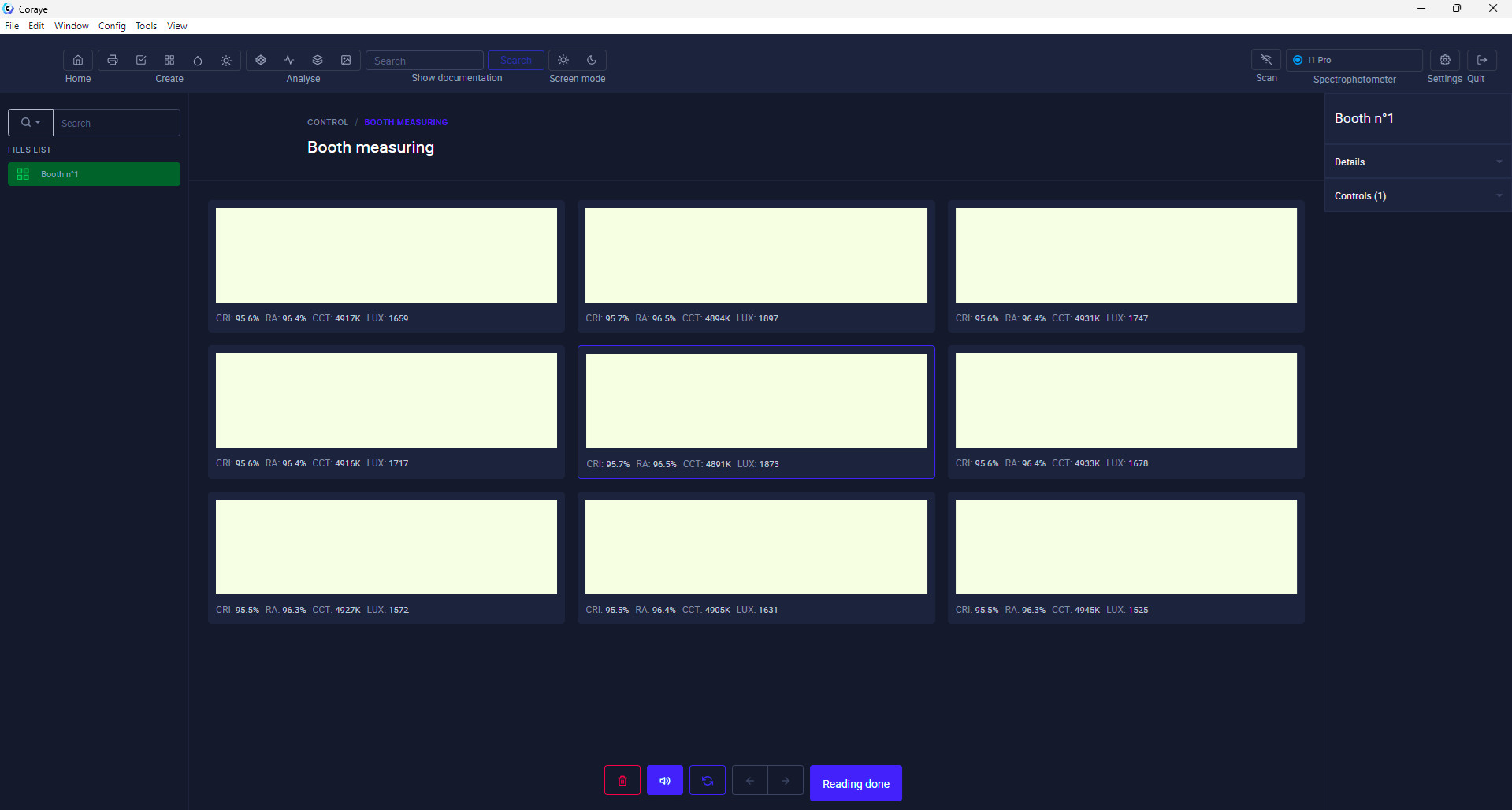
The order of the measurement zones is indicated in the interface

[![Light Control 8b.png](https://wiki.coraye.com/uploads/images/gallery/2024-08/scaled-1680-/light-control-8b.png)](https://wiki.coraye.com/uploads/images/gallery/2024-08/light-control-8b.png)

<p class="callout info">You have the option to re-measure by selecting the desired area  
The measurement values ​​are displayed under each measurement area.</p>

Once the 9 zones have been measured, click on the "Reading done" button. Note that this remains grayed out until the 9 zones have been measured.

[![Light Control 9.png](https://wiki.coraye.com/uploads/images/gallery/2024-08/scaled-1680-/light-control-9.png)](https://wiki.coraye.com/uploads/images/gallery/2024-08/light-control-9.png)
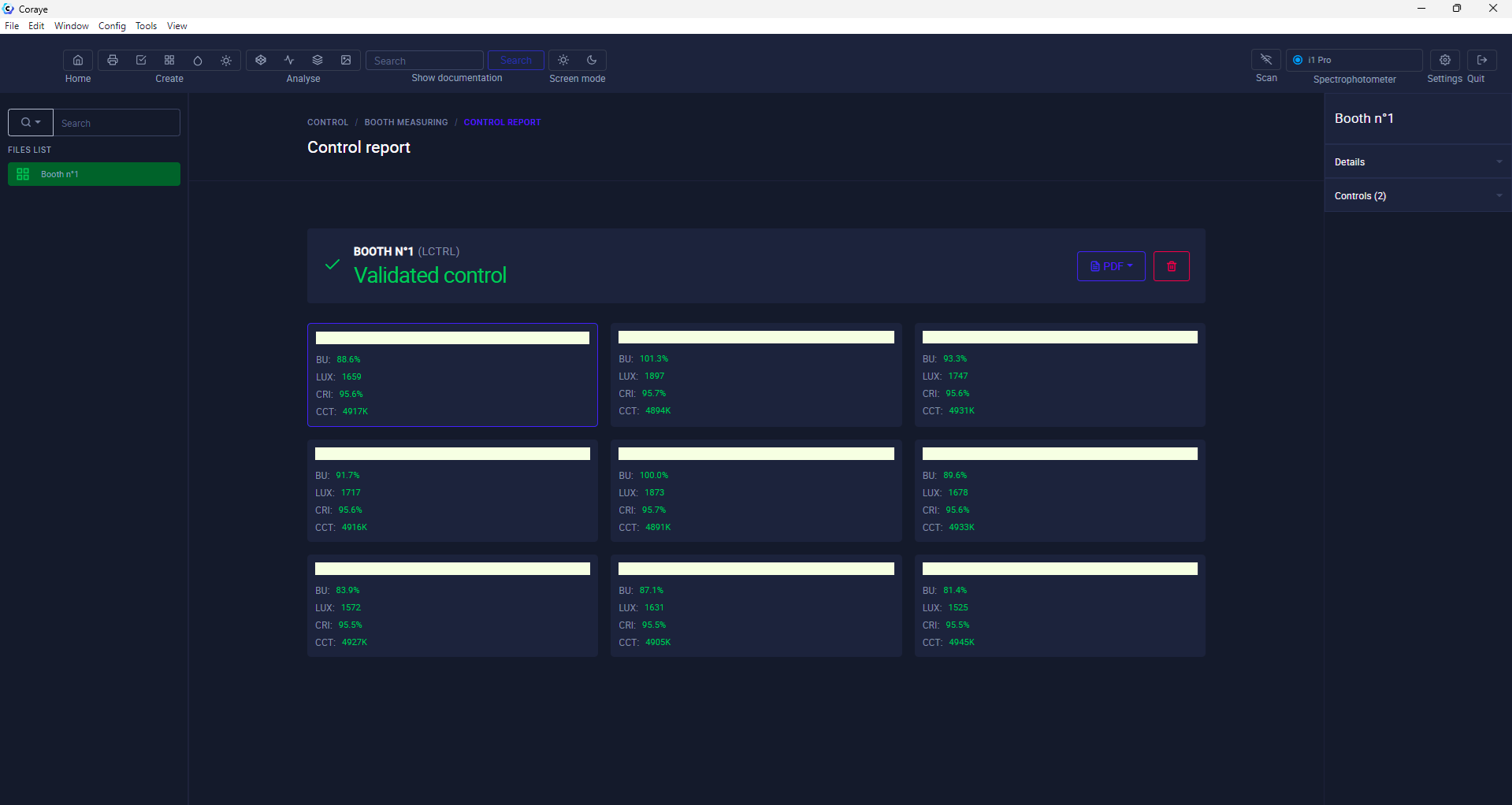
##### Control report

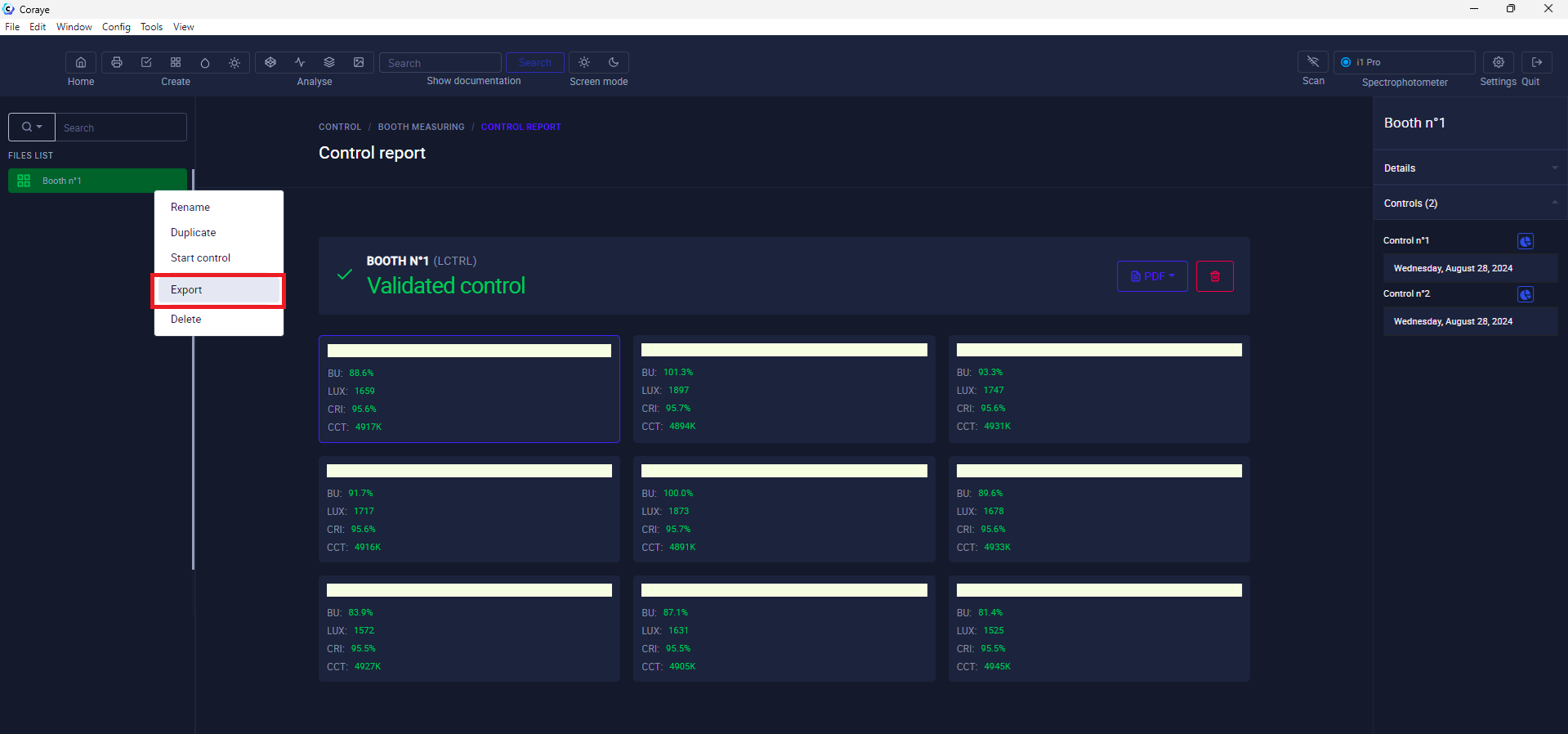
Once the measurements are completed, the reading report is displayed

[![Light Control 10.png](https://wiki.coraye.com/uploads/images/gallery/2024-08/scaled-1680-/light-control-10.png)](https://wiki.coraye.com/uploads/images/gallery/2024-08/light-control-10.png)
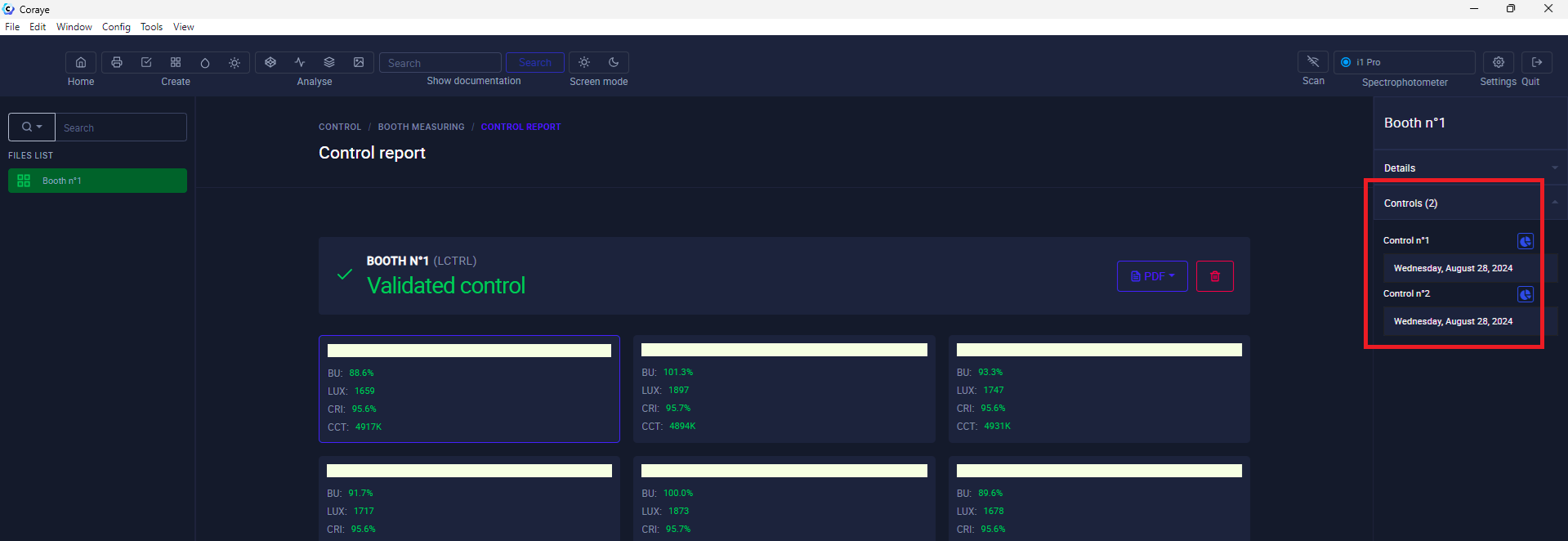
At the top right, the control history is displayed and allows you to view previous controls.

[![Light Control 11.png](https://wiki.coraye.com/uploads/images/gallery/2024-08/scaled-1680-/light-control-11.png)](https://wiki.coraye.com/uploads/images/gallery/2024-08/light-control-11.png)
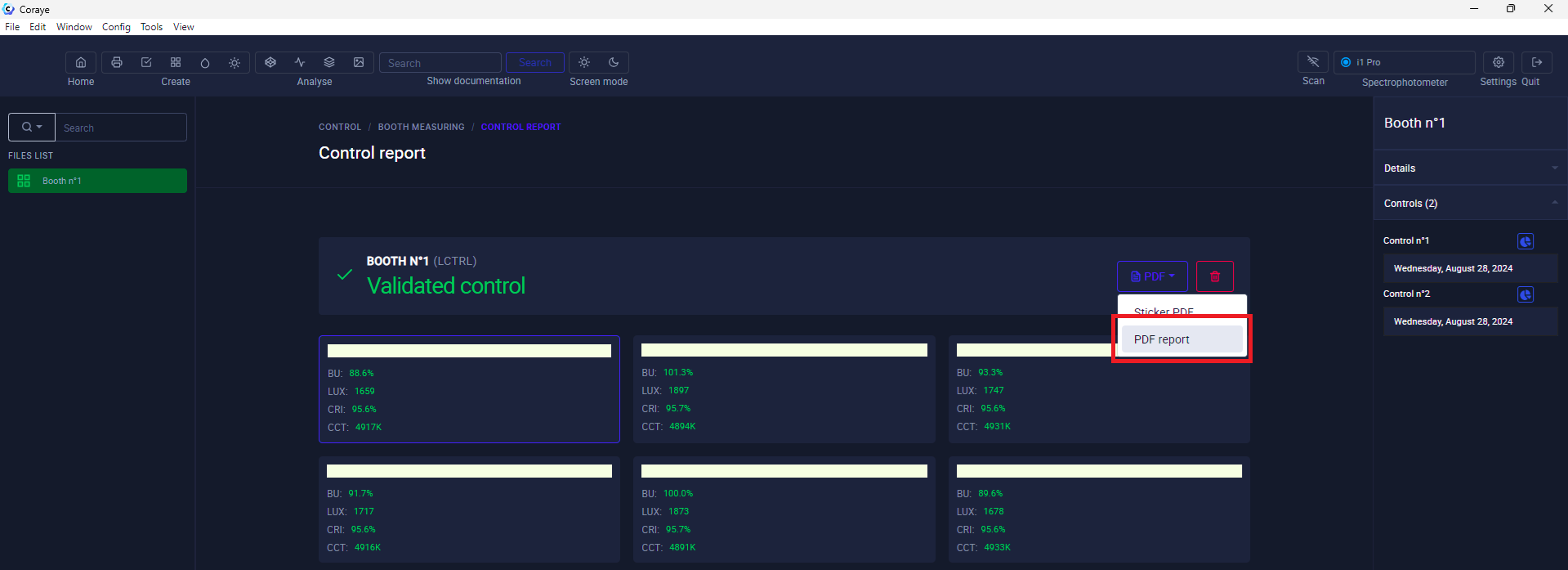
By clicking on the "PDF" button, you can obtain a report

[![Light Control 12.png](https://wiki.coraye.com/uploads/images/gallery/2024-08/scaled-1680-/light-control-12.png)](https://wiki.coraye.com/uploads/images/gallery/2024-08/light-control-12.png)
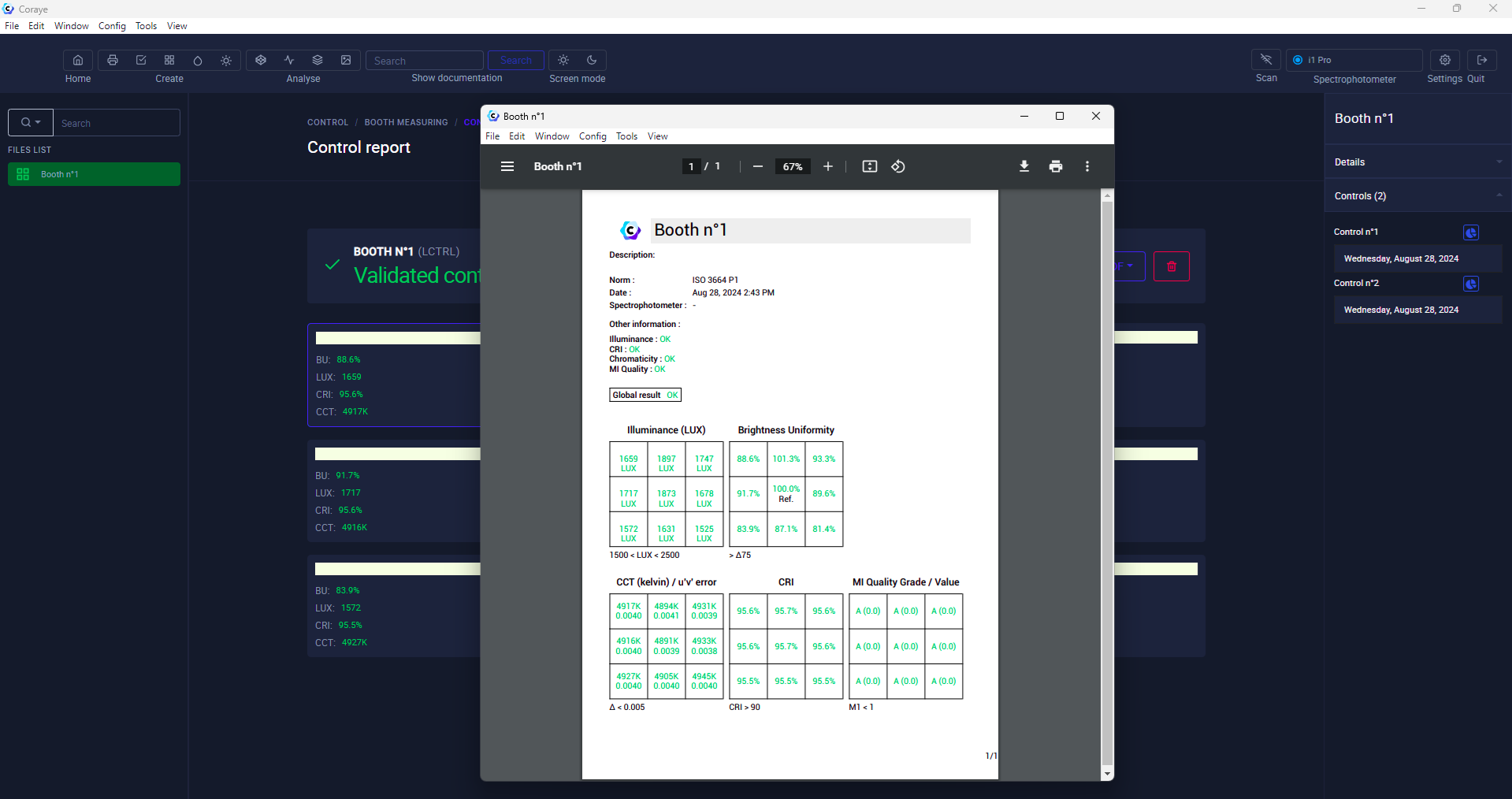
Displaying the report:

[![Light Control 13.png](https://wiki.coraye.com/uploads/images/gallery/2024-08/scaled-1680-/light-control-13.png)](https://wiki.coraye.com/uploads/images/gallery/2024-08/light-control-13.png)
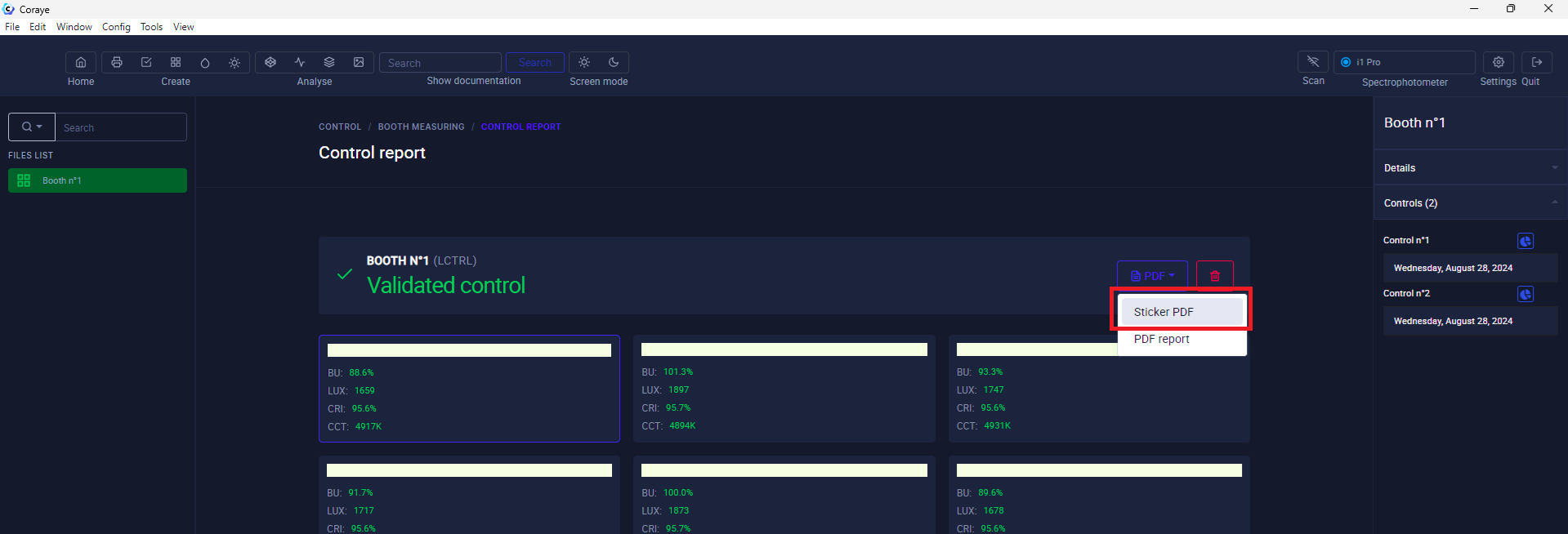
By clicking on the "PDF" button, you can obtain a label

[![Light Control 14.png](https://wiki.coraye.com/uploads/images/gallery/2024-08/scaled-1680-/light-control-14.png)](https://wiki.coraye.com/uploads/images/gallery/2024-08/light-control-14.png)
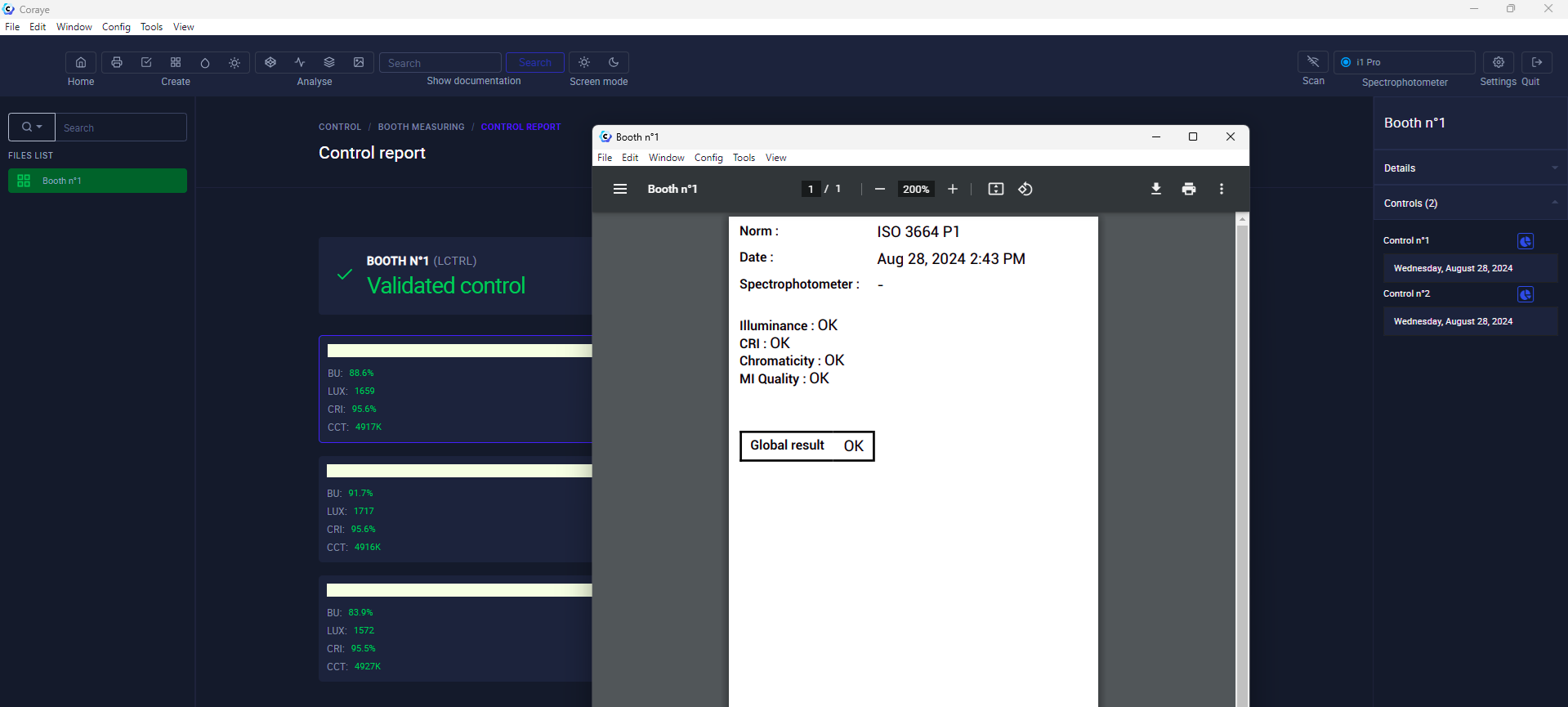
Displaying the label

[![Light Control 15.png](https://wiki.coraye.com/uploads/images/gallery/2024-08/scaled-1680-/light-control-15.png)](https://wiki.coraye.com/uploads/images/gallery/2024-08/light-control-15.png)
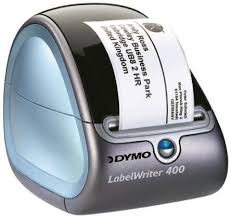
##### Printing the label on a Dymo label printer

To print a label, install a label printer and its driver, then click on the printer icon when you display the label.

[![Dymo.jpeg](https://wiki.coraye.com/uploads/images/gallery/2021-09/scaled-1680-/dymo.jpeg)](https://wiki.coraye.com/uploads/images/gallery/2021-09/dymo.jpeg)
##### Saving the ".lctrl" file

It is strongly recommended to save your control file to avoid losing it or to share it.

[![Light Control 16.png](https://wiki.coraye.com/uploads/images/gallery/2024-08/scaled-1680-/light-control-16.png)](https://wiki.coraye.com/uploads/images/gallery/2024-08/light-control-16.png)
#### 3) What You Need to Know About Controlling Your Cabins

<p class="callout info">The CIE Color Rendering Index (CRI) is a method of determining how well the illumination of a light source on eight samples compares to that provided by a reference source. Together, the CRI and CCT provide a numerical estimate of which reference (ideal) light source most closely matches a given artificial light and how much the difference is.  
The CRI is a quality index for evaluating an illuminant. It is expressed as a percentage. The higher the value, the better the quality of the illuminant.</p>

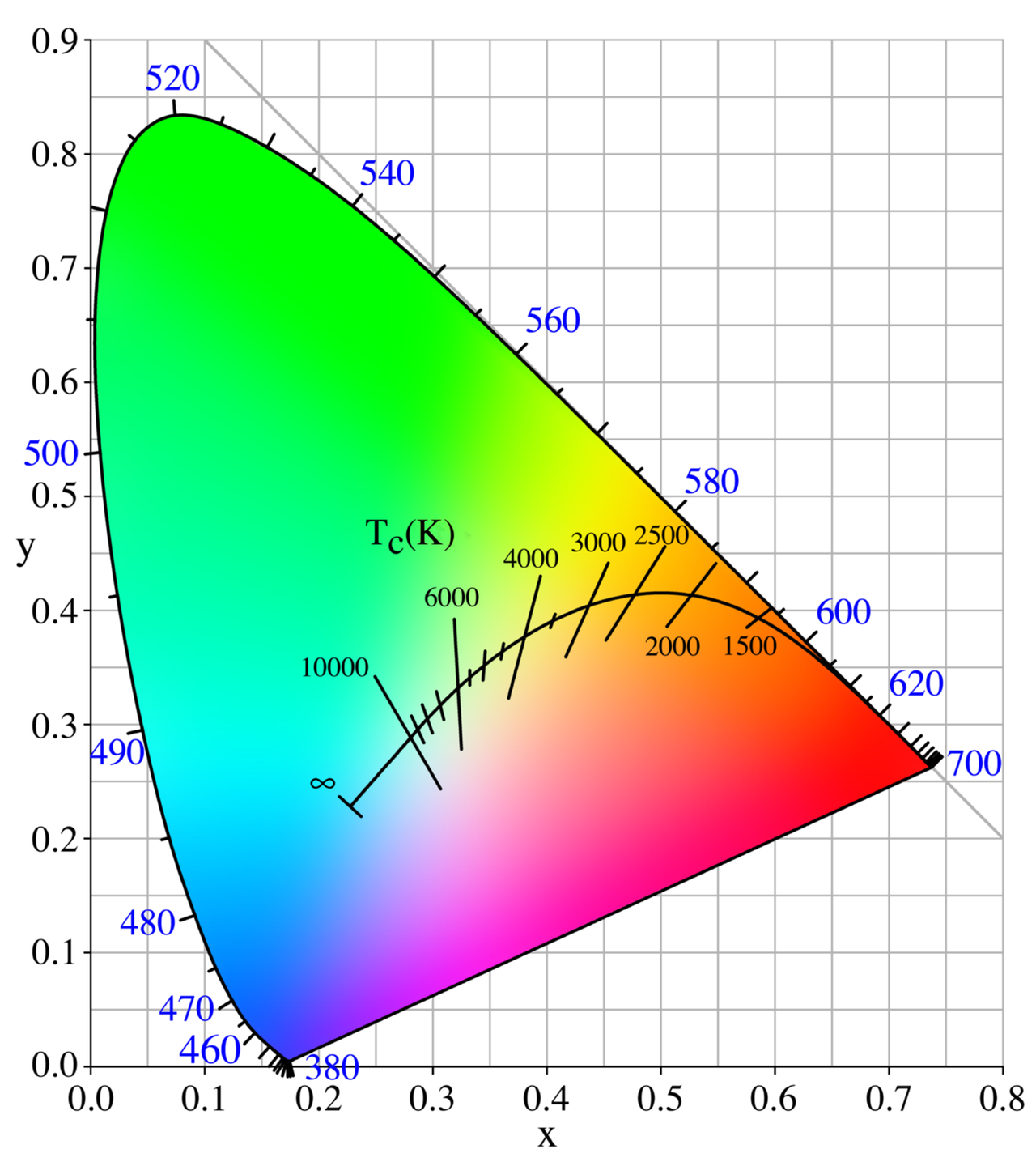
<p class="callout info">The color temperature of a light source is the temperature of an ideal blackbody radiator that emits light of a color comparable to that of the light source.  
Color temperature is a characteristic of visible light that has important applications in lighting, photography, videography, publishing, manufacturing, astrophysics, horticulture, and other fields.  
In practice, color temperature is meaningful only for light sources that actually correspond fairly closely to the radiation of some black bodies, that is, light ranging from red to orange to yellow to white to bluish-white; it makes no sense to speak of the color temperature of, for example, green or violet light.  
Color temperature is usually expressed in kelvins, using the symbol K, a unit of absolute temperature.</p>

<p class="callout info">Color temperatures above 5000 K are called "cool" (bluish) colors, while lower color temperatures (2700–3000 K) are called "warm" (yellowish) colors.  
"Warm" in this context is an analogy to the radiated heat flux of traditional incandescent lighting rather than the temperature.  
The spectral peak of warm-colored light is closer to the infrared, and most warm-colored natural light sources emit significant infrared radiation.  
The fact that "warm" lighting in this sense actually has a "cooler" color temperature is often a source of confusion.</p>

<span class="text-4505230f--TextH400-3033861f--textContentFamily-49a318e1"><span data-key="53f8bf2f92a64cfeba5124cbfe4166c7">Source: </span>[<span data-key="b586f022163e40f2840da7fb274af590">Wikipédia</span>](https://en.wikipedia.org/wiki/Color_temperature)</span>

[![image-1628606121525.png](https://wiki.coraye.com/uploads/images/gallery/2021-08/scaled-1680-/image-1628606121525.png)](https://wiki.coraye.com/uploads/images/gallery/2021-08/image-1628606121525.png)

---

##### Control your booth or viewing conditions

IllumReader can be useful to check uniformity, color temperature, light intensity in a booth and to check the viewing conditions of proofs, objects and prints.  
In the field of graphic arts, ISO standards have been defined to standardize the viewing conditions of prints.  
Knowing how to control your light is in a way knowing how to control color.

<table border="1" id="bkmrk-viewing-condition-p1"><tbody><tr><td class="align-center"><span data-slate-fragment="JTdCJTIyb2JqZWN0JTIyJTNBJTIyZG9jdW1lbnQlMjIlMkMlMjJkYXRhJTIyJTNBJTdCJTdEJTJDJTIybm9kZXMlMjIlM0ElNUIlN0IlMjJvYmplY3QlMjIlM0ElMjJibG9jayUyMiUyQyUyMnR5cGUlMjIlM0ElMjJoZWFkaW5nLTIlMjIlMkMlMjJpc1ZvaWQlMjIlM0FmYWxzZSUyQyUyMmRhdGElMjIlM0ElN0IlN0QlMkMlMjJub2RlcyUyMiUzQSU1QiU3QiUyMm9iamVjdCUyMiUzQSUyMnRleHQlMjIlMkMlMjJsZWF2ZXMlMjIlM0ElNUIlN0IlMjJvYmplY3QlMjIlM0ElMjJsZWFmJTIyJTJDJTIydGV4dCUyMiUzQSUyMkNvbnRyJUMzJUI0bGV6JTIwdm90cmUlMjBzdGFuZCUyMG91JTIwdm9zJTIwY29uZGl0aW9ucyUyMGQnb2JzZXJ2YXRpb24lMjIlMkMlMjJtYXJrcyUyMiUzQSU1QiU1RCU3RCU1RCU3RCU1RCU3RCU1RCU3RA==">Viewing condition</span></td><td class="align-center"><span data-slate-fragment="JTdCJTIyb2JqZWN0JTIyJTNBJTIyZG9jdW1lbnQlMjIlMkMlMjJkYXRhJTIyJTNBJTdCJTdEJTJDJTIybm9kZXMlMjIlM0ElNUIlN0IlMjJvYmplY3QlMjIlM0ElMjJibG9jayUyMiUyQyUyMnR5cGUlMjIlM0ElMjJoZWFkaW5nLTIlMjIlMkMlMjJpc1ZvaWQlMjIlM0FmYWxzZSUyQyUyMmRhdGElMjIlM0ElN0IlN0QlMkMlMjJub2RlcyUyMiUzQSU1QiU3QiUyMm9iamVjdCUyMiUzQSUyMnRleHQlMjIlMkMlMjJsZWF2ZXMlMjIlM0ElNUIlN0IlMjJvYmplY3QlMjIlM0ElMjJsZWFmJTIyJTJDJTIydGV4dCUyMiUzQSUyMkNvbnRyJUMzJUI0bGV6JTIwdm90cmUlMjBzdGFuZCUyMG91JTIwdm9zJTIwY29uZGl0aW9ucyUyMGQnb2JzZXJ2YXRpb24lMjIlMkMlMjJtYXJrcyUyMiUzQSU1QiU1RCU3RCU1RCU3RCU1RCU3RCU1RCU3RA==">P1 Critical Comparison</span></td><td class="align-center"><span data-slate-fragment="JTdCJTIyb2JqZWN0JTIyJTNBJTIyZG9jdW1lbnQlMjIlMkMlMjJkYXRhJTIyJTNBJTdCJTdEJTJDJTIybm9kZXMlMjIlM0ElNUIlN0IlMjJvYmplY3QlMjIlM0ElMjJibG9jayUyMiUyQyUyMnR5cGUlMjIlM0ElMjJoZWFkaW5nLTIlMjIlMkMlMjJpc1ZvaWQlMjIlM0FmYWxzZSUyQyUyMmRhdGElMjIlM0ElN0IlN0QlMkMlMjJub2RlcyUyMiUzQSU1QiU3QiUyMm9iamVjdCUyMiUzQSUyMnRleHQlMjIlMkMlMjJsZWF2ZXMlMjIlM0ElNUIlN0IlMjJvYmplY3QlMjIlM0ElMjJsZWFmJTIyJTJDJTIydGV4dCUyMiUzQSUyMkNvbnRyJUMzJUI0bGV6JTIwdm90cmUlMjBzdGFuZCUyMG91JTIwdm9zJTIwY29uZGl0aW9ucyUyMGQnb2JzZXJ2YXRpb24lMjIlMkMlMjJtYXJrcyUyMiUzQSU1QiU1RCU3RCU1RCU3RCU1RCU3RCU1RCU3RA==">P2 Practical Appraisal</span></td></tr><tr><td><sup>[![image-1628602227797.png](https://wiki.coraye.com/uploads/images/gallery/2021-08/scaled-1680-/image-1628602227797.png)](https://wiki.coraye.com/uploads/images/gallery/2021-08/image-1628602227797.png)</sup></td><td><sub>[![image-1628602206892.png](https://wiki.coraye.com/uploads/images/gallery/2021-08/scaled-1680-/image-1628602206892.png)](https://wiki.coraye.com/uploads/images/gallery/2021-08/image-1628602206892.png)</sub></td><td><sup>[![image-1628606732447.png](https://wiki.coraye.com/uploads/images/gallery/2021-08/scaled-1680-/image-1628606732447.png)](https://wiki.coraye.com/uploads/images/gallery/2021-08/image-1628606732447.png)</sup></td></tr></tbody></table>

<div id="bkmrk--22"></div><div id="bkmrk--23"><svg class="icon-7f6730be--text-3f89f380" fill="currentColor" height="1em" preserveaspectratio="xMidYMid meet" stroke="none" viewbox="0 0 24 24" width="1em" xmlns="http://www.w3.org/2000/svg" xmlns:xlink="http://www.w3.org/1999/xlink"></svg>  
</div>##### ISO 3664:2009 - VIEWING CONDITIONS

Light source  
• The relative spectral power distribution should correspond to that of CIE illuminant D50.  
• The UV energy should comply with CIE illuminant D50 (correlated with M1 in ISO 13655).

Two levels of light intensity  
• Critical comparison P1: for example two prints: illuminance 2000 ± 500 Lux  
• Practical assessment of P2: illuminance 500 ± 125 Lux or exact illuminance setting of the lighting booth to be monitored

Additional definitions  
• Homogeneity (check over 9 zones in your booth)  
• Surroundings: neutral grey diffuse surface  
• Viewing angle to avoid reflections