# Control a standardized CMYK Mediawedge range

<div id="bkmrk-the-control-of-your-"><div>The control of your proofs, with Coraye Print Control, ensures that your prints will correspond to the certification criteria which are based on the ISO 12647-7 and ISO 12647-8 standards (ISO standard concerning the production of proofs).</div></div><span class="text-4505230f--TextH400-3033861f--textContentFamily-49a318e1"><span data-key="ae1009d277da43a487e8bec0ce3a53ab">The certificate obtained will guarantee your customers that your proof has been reproduced under the conditions defined by the Fogra or IDEAlliance standards.  
  
In this tutorial, we will learn how to measure a Fogra Mediawedge v3.0 range and edit a measurement report to check a proof against the Fogra 39 standard.  
To perform checks against other standards or other types of ranges, we will use the exact same method.</span></span>

Coraye uses the Print Control .pctrl format to store measurements and range control.

The "Print Control .pctrl" file contains all the information concerning the control range and the data associated with it.  
  
Reminder: during the step of creating the Print Control file, it is added to the left column of the Coraye interface  
  
**If this is not present, you will have to import it or create a new one.**

<span class="text-4505230f--TextH400-3033861f--textContentFamily-49a318e1">In the chapter "Creating a Standard CMYK Proof Reference" you will learn how to create your own .pctrl files</span>

<p class="callout success">For more information, see chapter: [Creating a reference for Standard CMYK Proof.](https://wiki.coraye.com/books/coraye-manual-en/page/create-a-reference-for-proofing "Create a baseline for Standard CMYK Proof")</p>

#### How to import a Print Control File (.pctrl)<svg class="icon-7f6730be--text-3f89f380" fill="none" height="1em" preserveaspectratio="xMidYMid meet" stroke="currentColor" stroke-linecap="round" stroke-linejoin="round" stroke-width="2" viewbox="0 0 24 24" width="1em" xmlns="http://www.w3.org/2000/svg"></svg>

The first step is to import the .pctrl files

<div id="bkmrk-"><div><div><div><div data-editioncontainer="true"><div data-gramm="false" data-key="d26c8eb39f0a4146a8ae76dfc2c4ae5f" data-slate-editor="true"><div data-key="88405c8f9c7848cb9e3a8e0c2f6b5e35" data-slate-void="true"><div>[![image-1629206215413.png](https://wiki.coraye.com/uploads/images/gallery/2021-08/scaled-1680-/image-1629206215413.png)](https://wiki.coraye.com/uploads/images/gallery/2021-08/image-1629206215413.png)</div></div></div></div></div></div></div></div><span class="text-4505230f--TextH400-3033861f--textContentFamily-49a318e1"><span data-key="dbfe3c563d924940ab97225eec8b7352">We will therefore start by importing the one from the Fogra 39 Mediawedge v3.0 measurable with the XRite I1 Pro2 spectrophotometer. From Coraye, **File / Open file** then select the .pctrl file to import.</span></span>

<div id="bkmrk--0"><div><div><div data-editioncontainer="true"><div data-gramm="false" data-key="d26c8eb39f0a4146a8ae76dfc2c4ae5f" data-slate-editor="true"><div data-key="0ddbb8fb85d24afbac799c0c628b6995" data-slate-void="true"><div>[![Open CTRL.png](https://wiki.coraye.com/uploads/images/gallery/2021-09/scaled-1680-/open-ctrl.png)](https://wiki.coraye.com/uploads/images/gallery/2021-09/open-ctrl.png)</div></div></div></div></div></div></div><div id="bkmrk--1"></div>#### Beginning of the measurement procedure of the Mediawedge range<svg class="icon-7f6730be--text-3f89f380" fill="none" height="1em" preserveaspectratio="xMidYMid meet" stroke="currentColor" stroke-linecap="round" stroke-linejoin="round" stroke-width="2" viewbox="0 0 24 24" width="1em" xmlns="http://www.w3.org/2000/svg"></svg>

<span class="text-4505230f--TextH400-3033861f--textContentFamily-49a318e1"><span data-key="0e746e317d8d4053b99717b2f30d9409">To start the measurement, select the " **Start control** " command by right-clicking on the .pctrl file located in the left column.</span></span>

<div id="bkmrk--2"><div><div><div data-editioncontainer="true"><div data-gramm="false" data-key="d26c8eb39f0a4146a8ae76dfc2c4ae5f" data-slate-editor="true"><div data-key="cc85d7ba1d944fe59666b5f58015c86e" data-slate-void="true"><div>[![Easy Start Control.png](https://wiki.coraye.com/uploads/images/gallery/2021-09/scaled-1680-/easy-start-control.png)](https://wiki.coraye.com/uploads/images/gallery/2021-09/easy-start-control.png)</div></div></div></div></div></div></div><span class="text-4505230f--TextH400-3033861f--textContentFamily-49a318e1"><span data-key="0d8116cdc3a74336903ce0f82e1a0a85">The test chart associated with the Print Control file appears</span></span>

<div id="bkmrk--3"><div><div><div data-editioncontainer="true"><div data-gramm="false" data-key="d26c8eb39f0a4146a8ae76dfc2c4ae5f" data-slate-editor="true"><div data-key="3f049c448d58496ba0212e77037f0690" data-slate-void="true"><div>[![First Step PC.png](https://wiki.coraye.com/uploads/images/gallery/2021-09/scaled-1680-/first-step-pc.png)](https://wiki.coraye.com/uploads/images/gallery/2021-09/first-step-pc.png)</div></div></div></div></div></div></div><div id="bkmrk--4"></div>#### <span class="text-4505230f--HeadingH600-23f228db--textContentFamily-49a318e1"><span data-key="fb64544d3d37471ba3447deb8ddd09e8">Printing the range</span></span><svg class="icon-7f6730be--text-3f89f380" fill="none" height="1em" preserveaspectratio="xMidYMid meet" stroke="currentColor" stroke-linecap="round" stroke-linejoin="round" stroke-width="2" viewbox="0 0 24 24" width="1em" xmlns="http://www.w3.org/2000/svg"></svg>

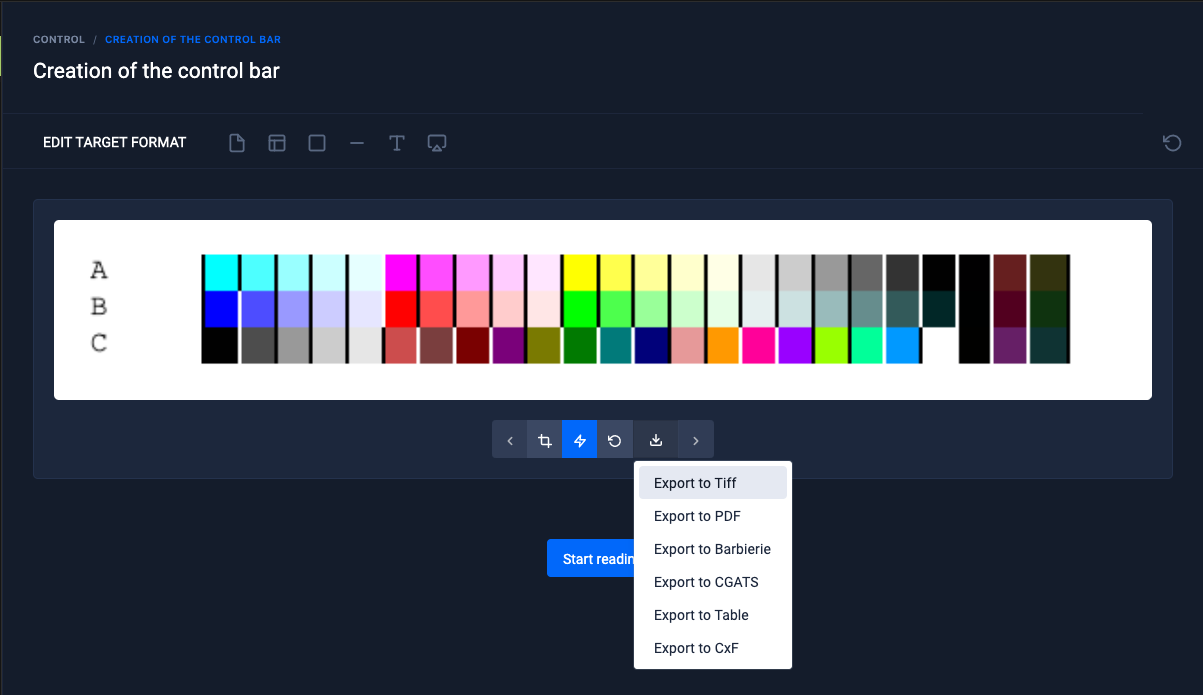
<span class="text-4505230f--TextH400-3033861f--textContentFamily-49a318e1"><span data-key="2c16c135bd4b4cc38a5ad1433b8fbbb2">If the range you want to check is not already printed, you can save it in Tiff or Pdf format for printing in your proofing system.</span></span>

<div id="bkmrk--5"><div><div><div data-editioncontainer="true"><div data-gramm="false" data-key="d26c8eb39f0a4146a8ae76dfc2c4ae5f" data-slate-editor="true"><div data-key="dd2e710242f340d6a48eabde3cb70ea1" data-slate-void="true"><div>[![Export Target to print.png](https://wiki.coraye.com/uploads/images/gallery/2021-09/scaled-1680-/export-target-to-print.png)](https://wiki.coraye.com/uploads/images/gallery/2021-09/export-target-to-print.png)</div></div></div></div></div></div></div><span class="text-4505230f--TextH400-3033861f--textContentFamily-49a318e1"><span data-key="4436e988001c45f9a53502f8d3a55a9b">When you are ready to measure the printed range, click on the " **Start reading** " button. Then select the measurement mode according to the reference standard and the possibilities of your measuring instrument.  
In our example, we will select the M0 mode corresponding to the Fogra 39 standard. Click on " **I'm Ready** " to start the measurement</span></span>

<div id="bkmrk--6"><div><div><div data-editioncontainer="true"><div data-gramm="false" data-key="d26c8eb39f0a4146a8ae76dfc2c4ae5f" data-slate-editor="true"><div data-key="0dc300f9b3394cd095004f12a0881dd7" data-slate-void="true"><div>[![Reading Mode PC.png](https://wiki.coraye.com/uploads/images/gallery/2021-09/scaled-1680-/reading-mode-pc.png)](https://wiki.coraye.com/uploads/images/gallery/2021-09/reading-mode-pc.png)</div></div></div></div></div></div></div><span class="text-4505230f--TextH400-3033861f--textContentFamily-49a318e1"><span data-key="70008e6b33094639941c50581d9fc53c">Before starting the measurement, it is necessary to calibrate the spectrophotometer.</span></span>

<div id="bkmrk--7"><div><div><div data-editioncontainer="true"><div data-gramm="false" data-key="d26c8eb39f0a4146a8ae76dfc2c4ae5f" data-slate-editor="true"><div data-key="91cfd8222f724b67ab5d92ca67c7a519" data-slate-void="true"><div>[![PC calibration.png](https://wiki.coraye.com/uploads/images/gallery/2021-09/scaled-1680-/calibration-pc.png)](https://wiki.coraye.com/uploads/images/gallery/2021-09/calibration-pc.png)</div></div></div></div></div></div></div><span class="text-4505230f--TextH400-3033861f--textContentFamily-49a318e1"><span data-key="afda352f0e2a4c9d9975ced94e92c411">Position the spectrophotometer on its reference ceramic before clicking on the " **Start Calibration** " button</span></span>

<div id="bkmrk--8"><div><div><div data-editioncontainer="true"><div data-gramm="false" data-key="d26c8eb39f0a4146a8ae76dfc2c4ae5f" data-slate-editor="true"><div data-key="2bf58e977f944bcb8395ea0dea30328e" data-slate-void="true"><div>[![image-1629199850021.png](https://wiki.coraye.com/uploads/images/gallery/2021-08/scaled-1680-/image-1629199850021.png)](https://wiki.coraye.com/uploads/images/gallery/2021-08/image-1629199850021.png)</div></div></div></div></div></div></div><span class="text-4505230f--TextH400-3033861f--textContentFamily-49a318e1"><span data-key="6729d131bc504fa9a0b5030735083fb5">Start measuring the range</span></span>

<div id="bkmrk--9"><div><div><div data-editioncontainer="true"><div data-gramm="false" data-key="d26c8eb39f0a4146a8ae76dfc2c4ae5f" data-slate-editor="true"><div data-key="f8d71dfccec248bfa9290c66c0baadab" data-slate-void="true"><div>[![Ready to read.png](https://wiki.coraye.com/uploads/images/gallery/2021-09/scaled-1680-/ready-to-read.png)](https://wiki.coraye.com/uploads/images/gallery/2021-09/ready-to-read.png)</div></div></div></div></div></div></div><span class="text-4505230f--TextH400-3033861f--textContentFamily-49a318e1"><span data-key="9ccce6f3f61d47069eb18e266900881f">  
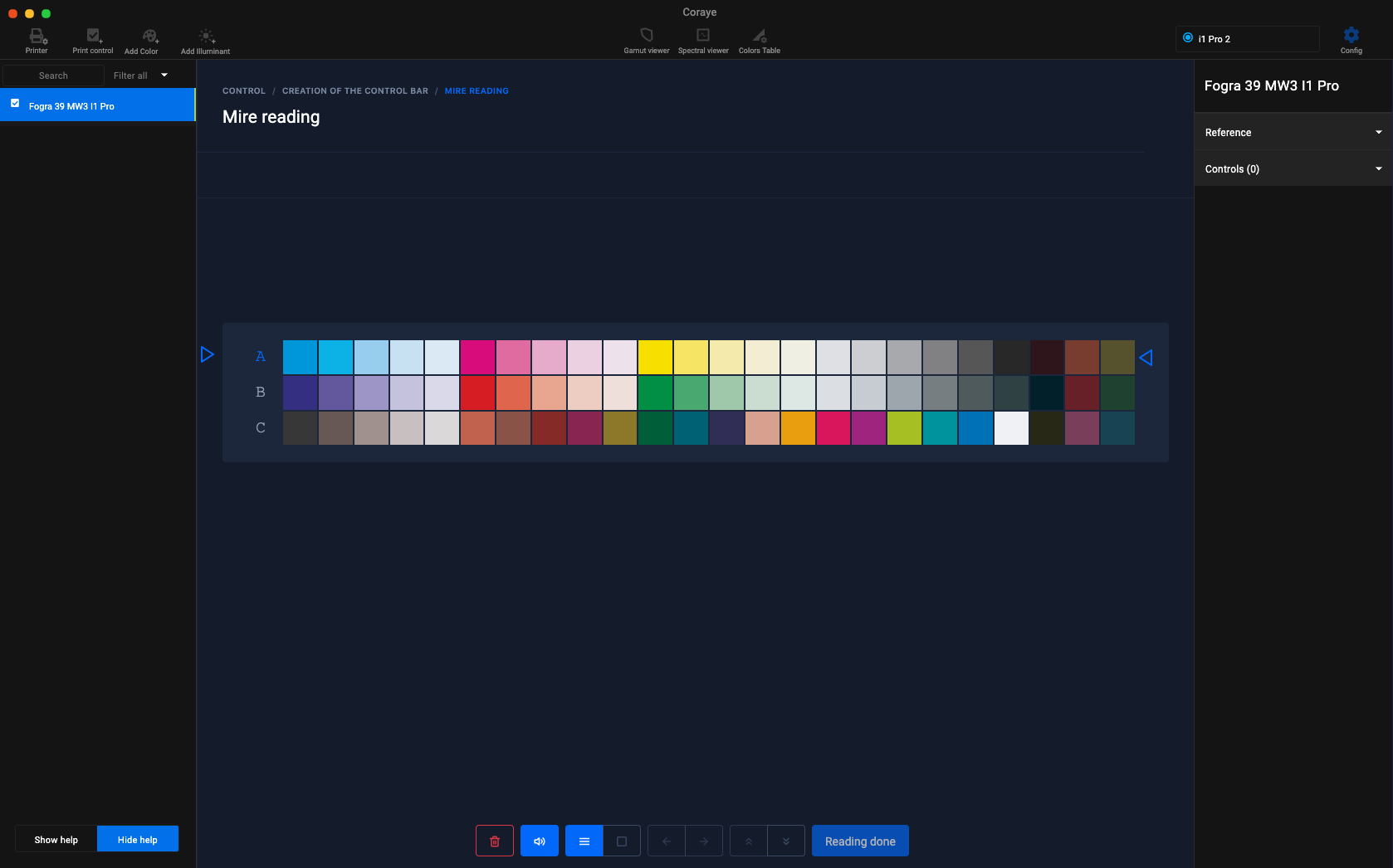
Position the spectrophotometer on its ruler so that the lines are measured one by one, starting and ending with the blank to the right and left of the range.</span></span>

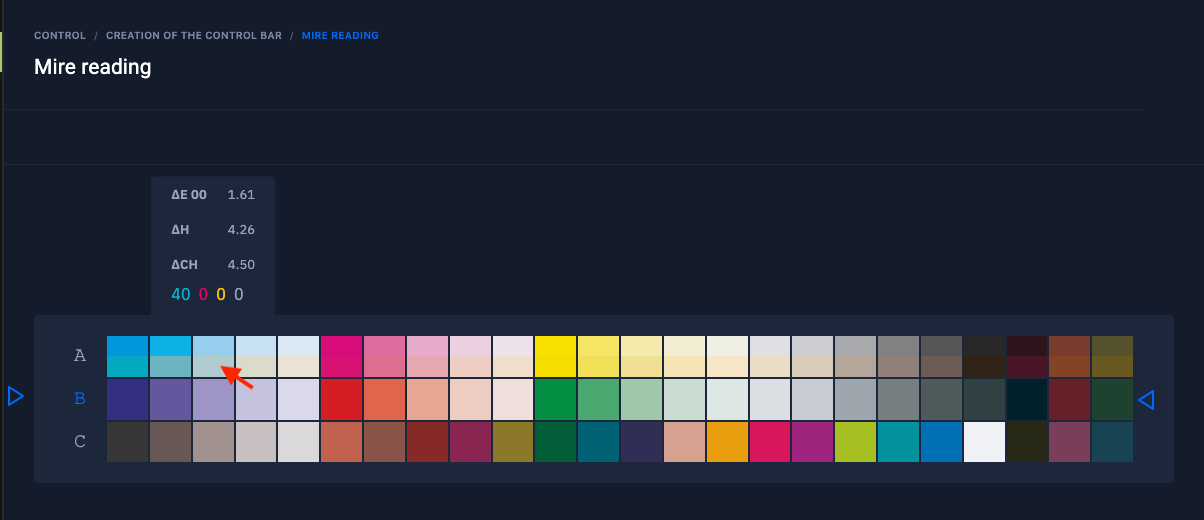
<div id="bkmrk--10"><div><div><div data-editioncontainer="true"><div data-gramm="false" data-key="d26c8eb39f0a4146a8ae76dfc2c4ae5f" data-slate-editor="true"><div data-key="edaea232766e4446b2edd734f24e425d" data-slate-void="true"><div>[![MW measurement I1Pro2.jpg](https://wiki.coraye.com/uploads/images/gallery/2021-09/scaled-1680-/mesure-mw-i1pro2.jpg)](https://wiki.coraye.com/uploads/images/gallery/2021-09/mesure-mw-i1pro2.jpg)</div></div></div></div></div></div></div><span class="text-4505230f--TextH400-3033861f--textContentFamily-49a318e1"><span data-key="25b4430793154183b92d7bdf19741c6c">The line to be measured is indicated by the blue arrows on the left and right on the screen. By hovering over the patches already measured, the information on the Delta E, H and Ch as well as the CMYK values appear (For the RGB ranges, you will see the RGB values appear).</span></span>

<div id="bkmrk--11"><div><div><div data-editioncontainer="true"><div data-gramm="false" data-key="d26c8eb39f0a4146a8ae76dfc2c4ae5f" data-slate-editor="true"><div data-key="63f8d8b8ccfd42fabc5f9bdffe985731" data-slate-void="true"><div>[![MW PC measurement 1.png](https://wiki.coraye.com/uploads/images/gallery/2021-09/scaled-1680-/mesure-mw-pc-1.png)](https://wiki.coraye.com/uploads/images/gallery/2021-09/mesure-mw-pc-1.png)</div></div></div></div></div></div></div><span class="text-4505230f--TextH400-3033861f--textContentFamily-49a318e1"><span data-key="a10ce8e2b42b46cc8bae5bb2ab22fa2e">  
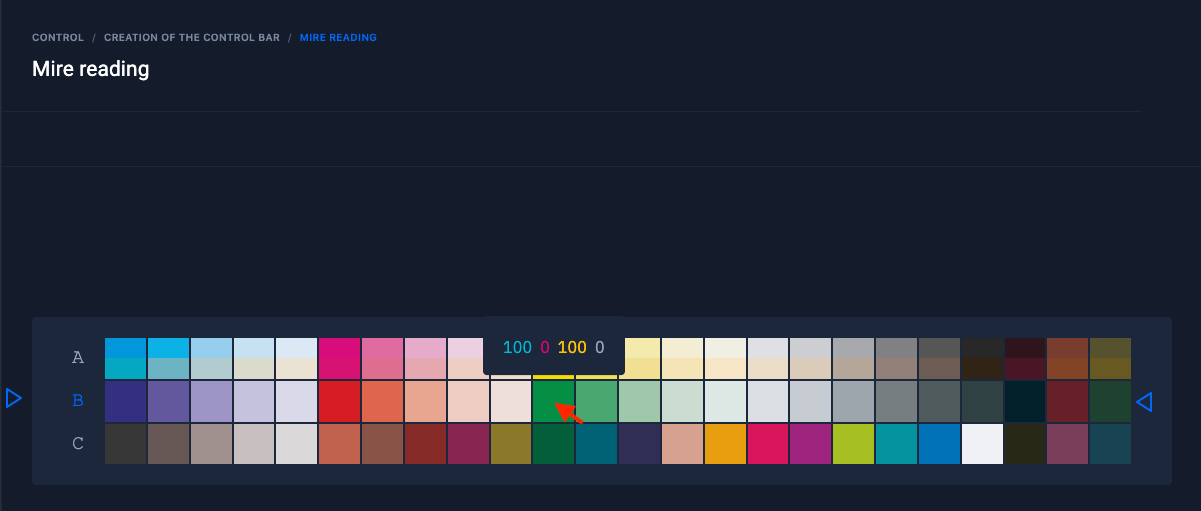
Regarding patches not yet measured, only CMYK (or RGB) values will appear when hovering over the patch.</span></span>

<div id="bkmrk--12"><div><div><div data-editioncontainer="true"><div data-gramm="false" data-key="d26c8eb39f0a4146a8ae76dfc2c4ae5f" data-slate-editor="true"><div data-key="1b8d043bbe1a4b979b87ff020694a18e" data-slate-void="true"><div>[![MW PC measurement 2.png](https://wiki.coraye.com/uploads/images/gallery/2021-09/scaled-1680-/mesure-mw-pc-2.png)](https://wiki.coraye.com/uploads/images/gallery/2021-09/mesure-mw-pc-2.png)</div></div></div></div></div></div></div>#### <span class="text-4505230f--HeadingH600-23f228db--textContentFamily-49a318e1"><span data-key="e839bfbbd77e4f7a94463de51b476521">  
Icons located at the bottom of the measurement window</span></span><svg class="icon-7f6730be--text-3f89f380" fill="none" height="1em" preserveaspectratio="xMidYMid meet" stroke="currentColor" stroke-linecap="round" stroke-linejoin="round" stroke-width="2" viewbox="0 0 24 24" width="1em" xmlns="http://www.w3.org/2000/svg"></svg>

##### <span class="text-4505230f--HeadingH400-686c0942--textContentFamily-49a318e1"><span data-key="333ad792eb0949aca2bb73c0d3a94514">  
Resetting the measurement  
</span></span><svg class="icon-7f6730be--text-3f89f380" fill="none" height="1em" preserveaspectratio="xMidYMid meet" stroke="currentColor" stroke-linecap="round" stroke-linejoin="round" stroke-width="2" viewbox="0 0 24 24" width="1em" xmlns="http://www.w3.org/2000/svg"></svg>

<div id="bkmrk--13"><div><div><div data-editioncontainer="true"><div data-gramm="false" data-key="d26c8eb39f0a4146a8ae76dfc2c4ae5f" data-slate-editor="true"><div data-key="7bddddabaa5e4f75b41f045b635b5d7c" data-slate-void="true"><div>![Reset reading PC.png](https://wiki.coraye.com/uploads/images/gallery/2021-09/scaled-1680-/reset-reading-pc.png)</div></div></div></div></div></div></div>##### <span class="text-4505230f--HeadingH400-686c0942--textContentFamily-49a318e1"><span data-key="7e5ab0f828d94a56a9b1a6856870247c">Enabling or disabling sound during measurement</span></span><svg class="icon-7f6730be--text-3f89f380" fill="none" height="1em" preserveaspectratio="xMidYMid meet" stroke="currentColor" stroke-linecap="round" stroke-linejoin="round" stroke-width="2" viewbox="0 0 24 24" width="1em" xmlns="http://www.w3.org/2000/svg"></svg>

<span class="text-4505230f--TextH400-3033861f--textContentFamily-49a318e1"><span data-key="cd101779d680464289de8f662eaa118a">Note that the strength of the beep depends on the sound setting of your computer.</span></span>

<div id="bkmrk--14"><div><div><div data-editioncontainer="true"><div data-gramm="false" data-key="d26c8eb39f0a4146a8ae76dfc2c4ae5f" data-slate-editor="true"><div data-key="4e326ab396d3498089e7ed27bae23146" data-slate-void="true"><div>[![Disable sound PC.png](https://wiki.coraye.com/uploads/images/gallery/2021-09/scaled-1680-/disable-sound-pc.png)](https://wiki.coraye.com/uploads/images/gallery/2021-09/disable-sound-pc.png)</div></div></div></div></div></div></div>##### <span class="text-4505230f--HeadingH400-686c0942--textContentFamily-49a318e1"><span data-key="7af7e235f1d3460b9599e83bb848531f">Row reading mode (default)</span></span><svg class="icon-7f6730be--text-3f89f380" fill="none" height="1em" preserveaspectratio="xMidYMid meet" stroke="currentColor" stroke-linecap="round" stroke-linejoin="round" stroke-width="2" viewbox="0 0 24 24" width="1em" xmlns="http://www.w3.org/2000/svg"></svg>

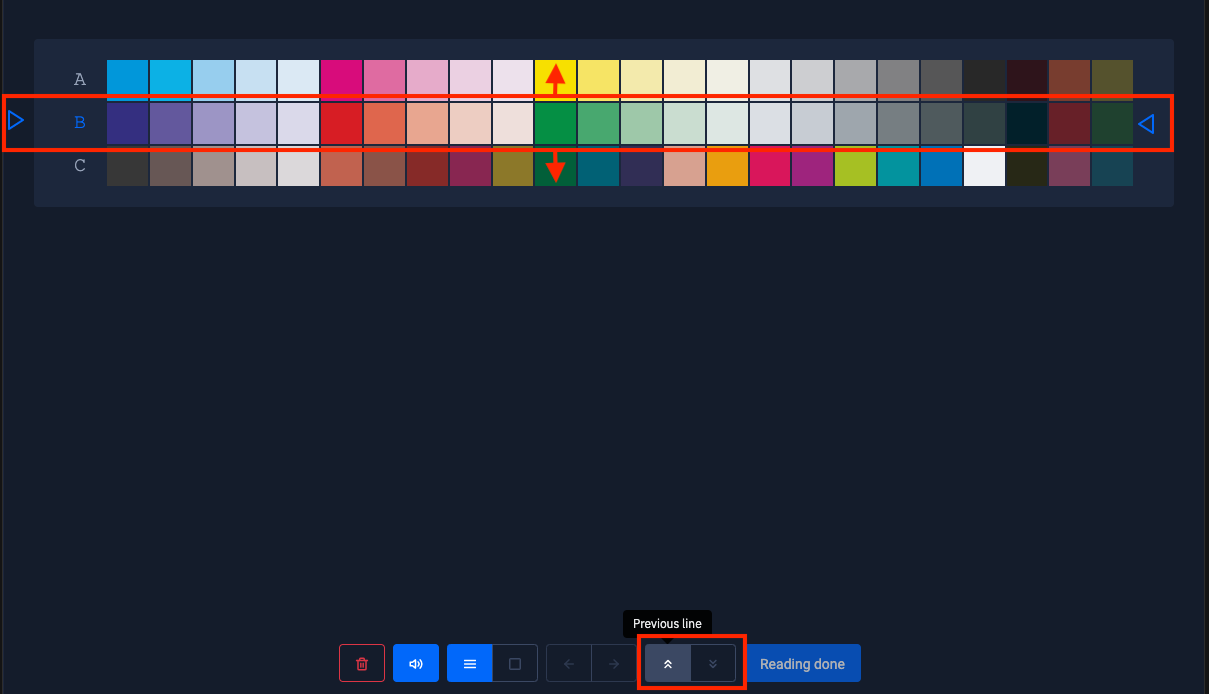
<div id="bkmrk--15"><div><div><div data-editioncontainer="true"><div data-gramm="false" data-key="d26c8eb39f0a4146a8ae76dfc2c4ae5f" data-slate-editor="true"><div data-key="b371965f5286476caf1351d985d259df" data-slate-void="true"><div>[![Line Mode PC.png](https://wiki.coraye.com/uploads/images/gallery/2021-09/scaled-1680-/line-mode-pc.png)](https://wiki.coraye.com/uploads/images/gallery/2021-09/line-mode-pc.png)</div></div></div></div></div></div></div><span class="text-4505230f--TextH400-3033861f--textContentFamily-49a318e1"><span data-key="4e587d0dfd0b4650a46d0ac34a157735">In this mode you can change line using the " **Next line** " or " **Previous line** " buttons. The "Up" and "Down" keys and clicking to the left of the letter associated with the line also allows you to change lines.</span></span>

<span class="text-4505230f--TextH400-3033861f--textContentFamily-49a318e1"><span data-key="f0b829b2e7c648a1b00e5ae1b5c9714f">CAUTION: If you click in a patch, the software will go into patch reading mode and request a calibration.</span></span>

<div id="bkmrk--16"><div><div><div data-editioncontainer="true"><div data-gramm="false" data-key="d26c8eb39f0a4146a8ae76dfc2c4ae5f" data-slate-editor="true"><div data-key="a21ab62be7b14a0ba02f95f2e309fd8e">[![Next or previous line PC 2.png](https://wiki.coraye.com/uploads/images/gallery/2021-09/scaled-1680-/next-or-previous-line-pc-2.png)](https://wiki.coraye.com/uploads/images/gallery/2021-09/next-or-previous-line-pc-2.png)</div></div></div></div></div></div>##### <span class="text-4505230f--HeadingH400-686c0942--textContentFamily-49a318e1"><span data-key="c586ce4f939247389ca320b742d2aa43">Patch-by-patch playback mode</span></span><svg class="icon-7f6730be--text-3f89f380" fill="none" height="1em" preserveaspectratio="xMidYMid meet" stroke="currentColor" stroke-linecap="round" stroke-linejoin="round" stroke-width="2" viewbox="0 0 24 24" width="1em" xmlns="http://www.w3.org/2000/svg"></svg>

<span class="text-4505230f--TextH400-3033861f--textContentFamily-49a318e1"><span data-key="cc26c2bf387c4ac9b11823fae8e82b7e">By clicking on the icon, " **Patches reading mode** " the software goes into patch by patch measurement mode and requests a calibration. This mode is useful if you cannot measure a line. You can enter and exit this mode at any time during the range measurement procedure.</span></span>

<div id="bkmrk--17"><div><div><div data-editioncontainer="true"><div data-gramm="false" data-key="d26c8eb39f0a4146a8ae76dfc2c4ae5f" data-slate-editor="true"><div data-key="e63ca70da7b64b83a2311d4850dea4e2" data-slate-void="true"><div>[![Patch reading mode PC.png](https://wiki.coraye.com/uploads/images/gallery/2021-09/scaled-1680-/patch-reading-mode-pc.png)](https://wiki.coraye.com/uploads/images/gallery/2021-09/patch-reading-mode-pc.png)</div></div></div></div></div></div></div><span class="text-4505230f--TextH400-3033861f--textContentFamily-49a318e1"><span data-key="590a9536d41d4790ada0dcea5827f3a6">The " **Patches reading mode** " mode requires equipping the spectrophotometer with its measurement accessory used to measure the samples.</span></span>

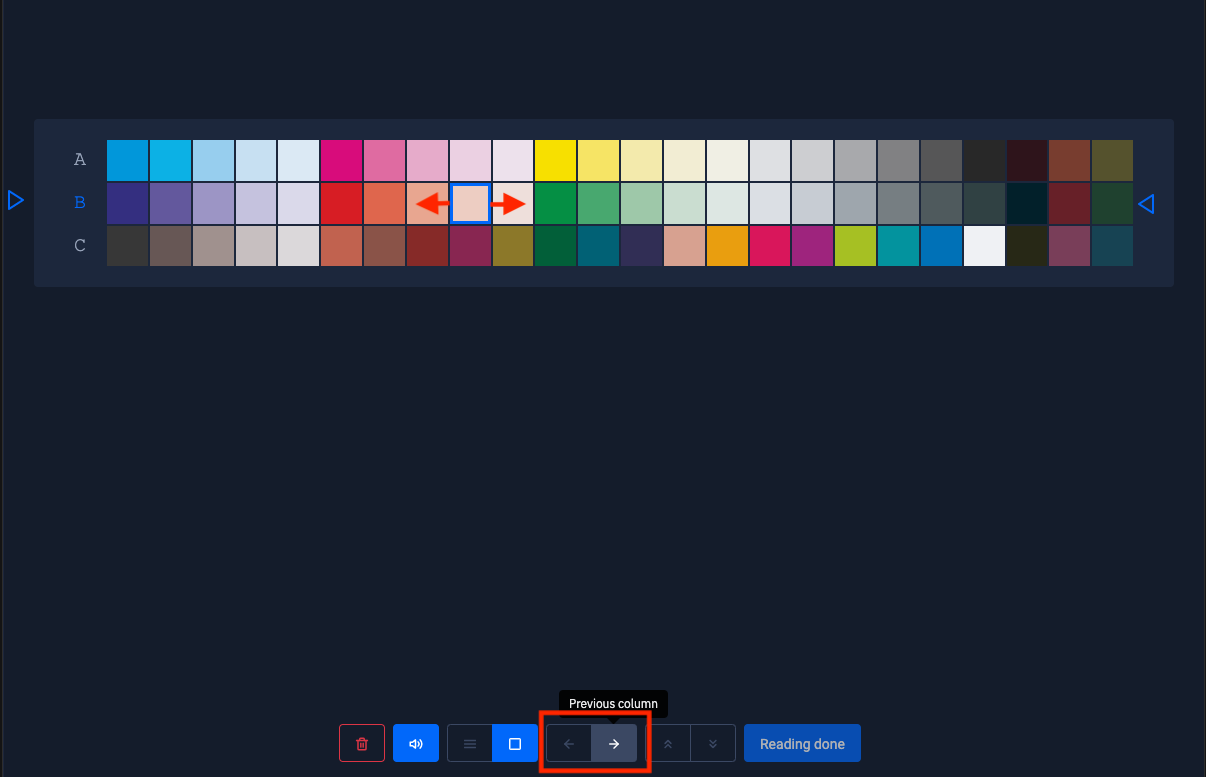
<div id="bkmrk--18"><div><div><div data-editioncontainer="true"><div data-gramm="false" data-key="d26c8eb39f0a4146a8ae76dfc2c4ae5f" data-slate-editor="true"><div data-key="c256acdf11d941878a9accf60385060e" data-slate-void="true"><div>[![I1Pro MW Patch PC.png](https://wiki.coraye.com/uploads/images/gallery/2021-09/scaled-1680-/i1pro-mw-patch-pc.png)](https://wiki.coraye.com/uploads/images/gallery/2021-09/i1pro-mw-patch-pc.png)</div></div></div></div></div></div></div><span class="text-4505230f--TextH400-3033861f--textContentFamily-49a318e1"><span data-key="6aeb78309f9e496fb7730c2931bdaf0f">In this mode you can change the box by using the buttons " **Next patch** " to go to the right or " **Previous patch** " to return to the left. The "Right" and "Left" keys also allow you to move around in the staff.</span></span>

<span class="text-4505230f--TextH400-3033861f--textContentFamily-49a318e1"><span data-key="c0c741d0538e4ed1adef7912dfc3e82b">CAUTION: Clicking to the left of the letter associated with the line exits "Patches reading mode" and returns you to "Line Mode" and requires a new calibration of the spectrophotometer.</span></span>

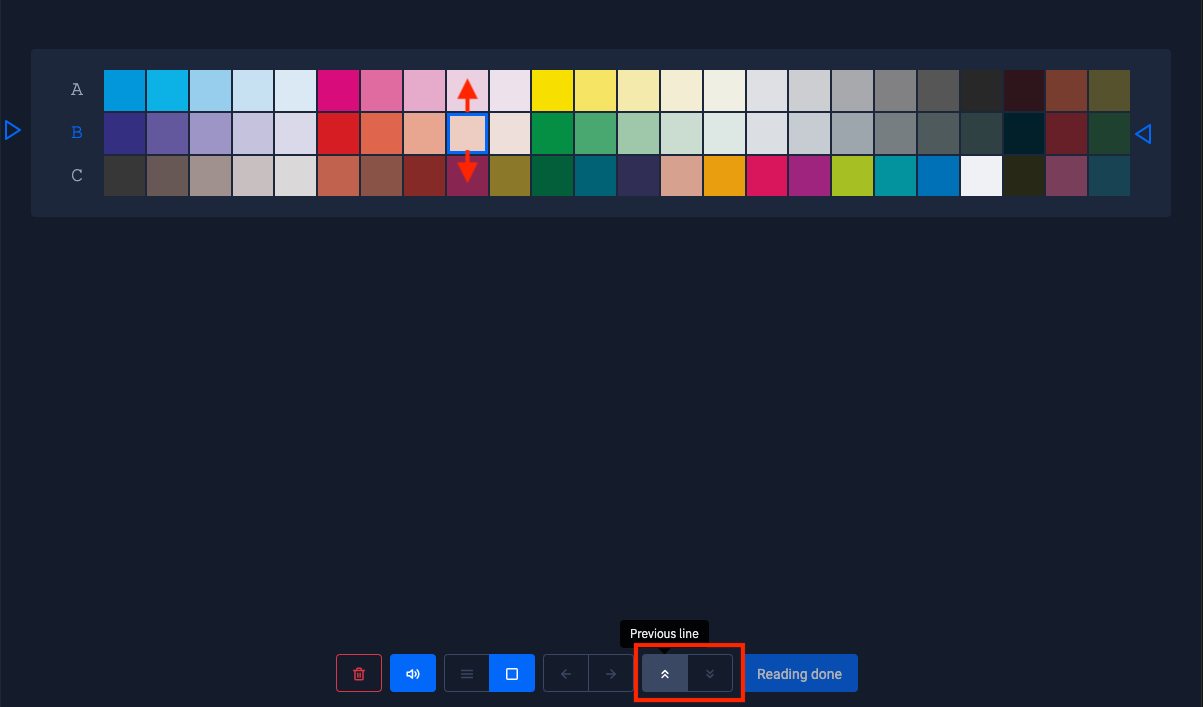
<div id="bkmrk--19"><div><div><div data-editioncontainer="true"><div data-gramm="false" data-key="d26c8eb39f0a4146a8ae76dfc2c4ae5f" data-slate-editor="true"><div data-key="766e23eed1a04764a22cfee8e9996096"></div><div data-key="e478ca01a5954018a9f89eb7d5ab18e3" data-slate-void="true"><div>[![Previous or next patch PC.png](https://wiki.coraye.com/uploads/images/gallery/2021-09/scaled-1680-/previous-or-next-patch-pc.png)](https://wiki.coraye.com/uploads/images/gallery/2021-09/previous-or-next-patch-pc.png)</div></div></div></div></div></div></div><span class="text-4505230f--TextH400-3033861f--textContentFamily-49a318e1"><span data-key="a7f49492fb974e8186dd490533d2c8e2">In this mode you can move up or down using the " **Next line** " buttons to go down, or " **Previous line** " to return up. The "Up" and "Down" keys also allow you to move around in the staff.</span></span>

<span class="text-4505230f--TextH400-3033861f--textContentFamily-49a318e1"><span data-key="d745bde4e76746be81e08ac348df0bc3">By clicking on a box with the mouse, you can directly access the selected patch.</span></span>

<div id="bkmrk--20"><div><div><div data-editioncontainer="true"><div data-gramm="false" data-key="d26c8eb39f0a4146a8ae76dfc2c4ae5f" data-slate-editor="true"><div data-key="8bedde0781fe4706af5f6d6b9176a99d"></div><div data-key="0298e2a6ed054f9da71d661411058a81" data-slate-void="true"><div>[![Next or previous line PC.png](https://wiki.coraye.com/uploads/images/gallery/2021-09/scaled-1680-/next-or-previous-line-pc.png)](https://wiki.coraye.com/uploads/images/gallery/2021-09/next-or-previous-line-pc.png)</div></div></div></div></div></div></div><span class="text-4505230f--TextH400-3033861f--textContentFamily-49a318e1"><span data-key="3905509ced5c4a20ad8194facd434eeb">When the test pattern is finished, click on " **Reading done** " to go to the reading report.</span></span>

<div id="bkmrk--21"><div><div><div data-editioncontainer="true"><div data-gramm="false" data-key="d26c8eb39f0a4146a8ae76dfc2c4ae5f" data-slate-editor="true"><div data-key="c8e2d52b1e5442009729c6d5cfaaeb73" data-slate-void="true"><div>[![Reading Done.png](https://wiki.coraye.com/uploads/images/gallery/2021-09/scaled-1680-/reading-done.png)](https://wiki.coraye.com/uploads/images/gallery/2021-09/reading-done.png)</div></div></div></div></div></div></div>#### <span class="text-4505230f--HeadingH600-23f228db--textContentFamily-49a318e1"><span data-key="953e81d07e1a4075b913f6e8540f8413">Reading report</span></span><svg class="icon-7f6730be--text-3f89f380" fill="none" height="1em" preserveaspectratio="xMidYMid meet" stroke="currentColor" stroke-linecap="round" stroke-linejoin="round" stroke-width="2" viewbox="0 0 24 24" width="1em" xmlns="http://www.w3.org/2000/svg"></svg>

<span class="text-4505230f--TextH400-3033861f--textContentFamily-49a318e1"><span data-key="3bb352ecfab44e4bb9be755f033abfa0">The measurement report consists of two parts:</span></span>

<span class="text-4505230f--TextH400-3033861f--textContentFamily-49a318e1"><span data-key="73eaccc0c04c4f83a909de7c6ca09ec0">The upper part displays the short report</span></span>

<div id="bkmrk--22"><div><div><div data-editioncontainer="true"><div data-gramm="false" data-key="d26c8eb39f0a4146a8ae76dfc2c4ae5f" data-slate-editor="true"><div data-key="177a2b0d3cca420a8d2a1e8b46cf5313" data-slate-void="true"><div>[![Report high.png](https://wiki.coraye.com/uploads/images/gallery/2021-09/scaled-1680-/rapport-haut.png)](https://wiki.coraye.com/uploads/images/gallery/2021-09/rapport-haut.png)</div></div></div></div></div></div></div><span class="text-4505230f--TextH400-3033861f--textContentFamily-49a318e1"><span data-key="cc9fc778c6d34462885a95935e6c5336">The lower part displays the long report</span></span>

<div id="bkmrk--23"><div><div><div data-editioncontainer="true"><div data-gramm="false" data-key="d26c8eb39f0a4146a8ae76dfc2c4ae5f" data-slate-editor="true"><div data-key="b6c2cc8245554c2890fe886e98020aa6" data-slate-void="true"><div>[![Low report.png](https://wiki.coraye.com/uploads/images/gallery/2021-09/scaled-1680-/rapport-bas.png)](https://wiki.coraye.com/uploads/images/gallery/2021-09/rapport-bas.png)</div></div></div></div></div></div></div><div id="bkmrk-display-of-results-a"><span class="text-4505230f--HeadingH600-23f228db--textContentFamily-49a318e1"><span data-key="8f049c1a797146f19ea453ad56247f22">Display of results according to prescribed values defined by ISO 12647-7 standards</span></span><svg class="icon-7f6730be--text-3f89f380" fill="none" height="1em" preserveaspectratio="xMidYMid meet" stroke="currentColor" stroke-linecap="round" stroke-linejoin="round" stroke-width="2" viewbox="0 0 24 24" width="1em" xmlns="http://www.w3.org/2000/svg"></svg></div><span class="text-4505230f--TextH400-3033861f--textContentFamily-49a318e1"><span data-key="0a28aceb7c294da0b9c928813146ccce">Whether for UGRA, Fogra or IDEAlliance, the tolerances associated with the different standards are automatically updated via our database.</span></span>

<div id="bkmrk--24"><div><div><div data-editioncontainer="true"><div data-gramm="false" data-key="d26c8eb39f0a4146a8ae76dfc2c4ae5f" data-slate-editor="true"><div data-key="111394d92fb642098b72ddc5ec89eb20" data-slate-void="true"><div>[![Selection Norm.png](https://wiki.coraye.com/uploads/images/gallery/2021-09/scaled-1680-/selection-norme.png)](https://wiki.coraye.com/uploads/images/gallery/2021-09/selection-norme.png)</div></div></div></div></div></div></div><span class="text-4505230f--TextH400-3033861f--textContentFamily-49a318e1"><span data-key="9cf7d2bf4a4343f7b16fc2b35f1fe9fd">It is also possible to customize the report by adding controls. Just click on the " **+ Add block** " button to access the available controls.</span></span>

<div id="bkmrk--25"><div><div><div data-editioncontainer="true"><div data-gramm="false" data-key="d26c8eb39f0a4146a8ae76dfc2c4ae5f" data-slate-editor="true"><div data-key="144576093e864d678e84f8a3c98f8966" data-slate-void="true"><div>[![Add bloc.png](https://wiki.coraye.com/uploads/images/gallery/2021-09/scaled-1680-/add-bloc.png)](https://wiki.coraye.com/uploads/images/gallery/2021-09/add-bloc.png)</div></div></div></div></div></div></div><span class="text-4505230f--TextH400-3033861f--textContentFamily-49a318e1"><span data-key="9d91ae70c1244a61bb6c00e89d417673">All unused controls are available to customize the Print Control. Just click on the blocks to add them to the list.</span></span>

<div id="bkmrk--26"><div><div><div data-editioncontainer="true"><div data-gramm="false" data-key="d26c8eb39f0a4146a8ae76dfc2c4ae5f" data-slate-editor="true"><div data-key="67c0a77deb8f4332b4cff04b134cf134" data-slate-void="true"><div>[![Add block 2.png](https://wiki.coraye.com/uploads/images/gallery/2021-09/scaled-1680-/add-bloc-2.png)](https://wiki.coraye.com/uploads/images/gallery/2021-09/add-bloc-2.png)</div></div></div></div></div></div></div><span class="text-4505230f--TextH400-3033861f--textContentFamily-49a318e1"><span data-key="d90f1245c41b45889bc7a0c5f1a380bb">To edit or delete a block, click on the three small dots located at the top right of the block.</span></span>

<span class="text-4505230f--TextH400-3033861f--textContentFamily-49a318e1"><span data-key="9576b4fe673141eea40b25d1bb3c4abf">If you modify a standard tolerance set, "-Edited" is automatically added after the name of the tolerance.</span></span>

<div id="bkmrk--27"><div><div><div data-editioncontainer="true"><div data-gramm="false" data-key="d26c8eb39f0a4146a8ae76dfc2c4ae5f" data-slate-editor="true"><div data-key="c901e71055534d20846f30a95f72cb71"></div><div data-key="b11e67faf33e453a932ac1e6ed26ad6b" data-slate-void="true"><div>[![Edit tolerance.png](https://wiki.coraye.com/uploads/images/gallery/2021-09/scaled-1680-/edit-tolerance.png)](https://wiki.coraye.com/uploads/images/gallery/2021-09/edit-tolerance.png)</div></div></div></div></div></div></div><span class="text-4505230f--TextH400-3033861f--textContentFamily-49a318e1"><span data-key="532665544d9e46718425c31bc56f2b4f">When you edit a tolerance, a window appears to modify the value of the original tolerance.</span></span>

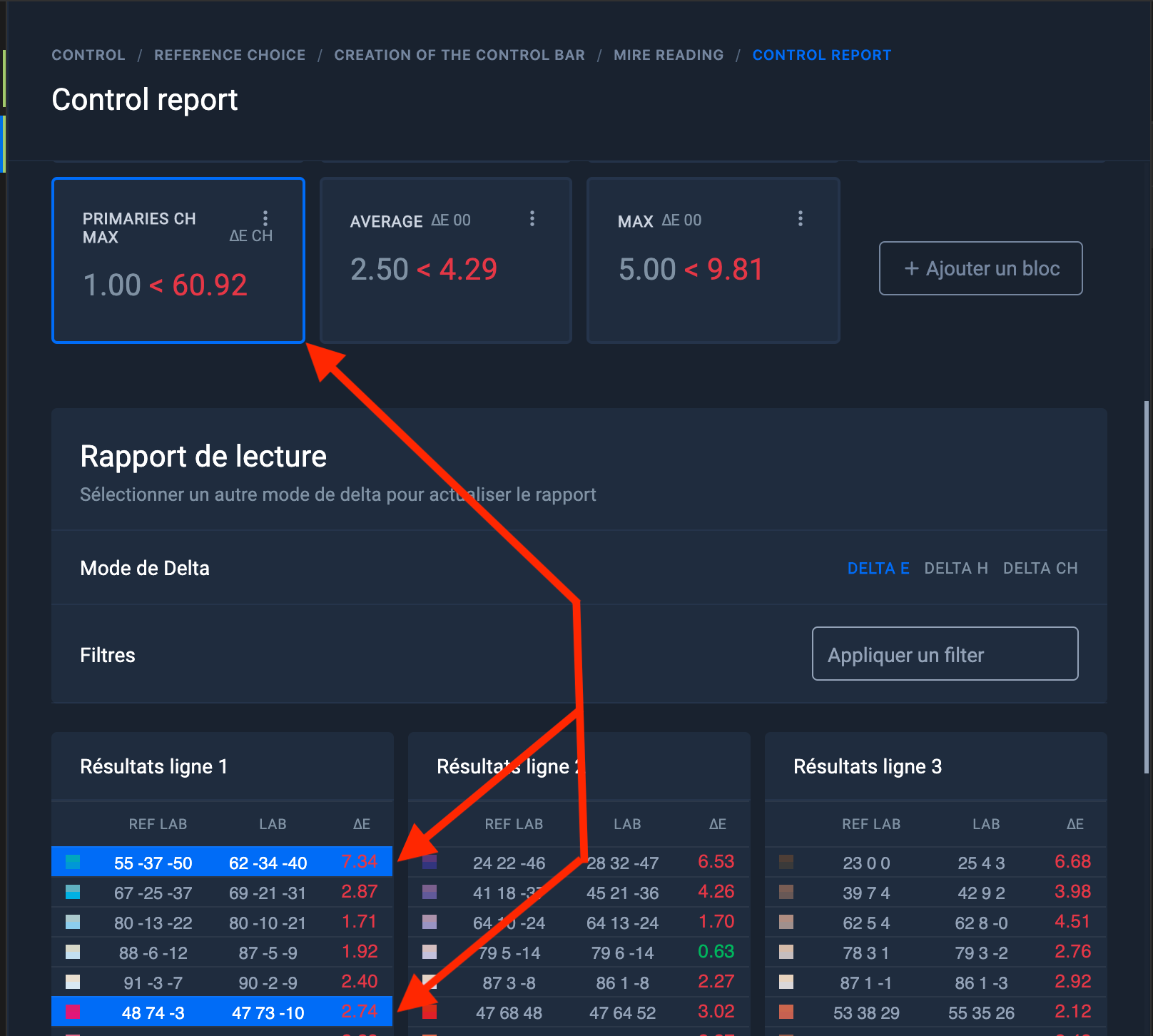
<div id="bkmrk--28"><div><div><div data-editioncontainer="true"><div data-gramm="false" data-key="d26c8eb39f0a4146a8ae76dfc2c4ae5f" data-slate-editor="true"><div data-key="99bc5cf43f2d4b9da16b23c2f6f14281" data-slate-void="true"><div>[![Limit Delta.png](https://wiki.coraye.com/uploads/images/gallery/2021-09/scaled-1680-/limit-delta.png)](https://wiki.coraye.com/uploads/images/gallery/2021-09/limit-delta.png)</div></div></div></div></div></div></div><span class="text-4505230f--TextH400-3033861f--textContentFamily-49a318e1"><span data-key="3224e4db094143c9900a23840ded2e1a">By clicking on one of the blocks, the colors associated with the tolerance calculation are highlighted in blue in the long report.</span></span>

<div id="bkmrk--29"><div><div><div data-editioncontainer="true"><div data-gramm="false" data-key="d26c8eb39f0a4146a8ae76dfc2c4ae5f" data-slate-editor="true"><div data-key="0186f9dcb46a4e1db8d257fb680f9b8f" data-slate-void="true"><div>[![Print Control - association data report.png](https://wiki.coraye.com/uploads/images/gallery/2021-09/scaled-1680-/print-control-association-data-report.png)](https://wiki.coraye.com/uploads/images/gallery/2021-09/print-control-association-data-report.png)</div></div></div></div></div></div></div>#### <span class="text-4505230f--HeadingH600-23f228db--textContentFamily-49a318e1"><span data-key="f00d7835bfe248ca84e17e23ee8c2592">Printing the label and long report</span></span><svg class="icon-7f6730be--text-3f89f380" fill="none" height="1em" preserveaspectratio="xMidYMid meet" stroke="currentColor" stroke-linecap="round" stroke-linejoin="round" stroke-width="2" viewbox="0 0 24 24" width="1em" xmlns="http://www.w3.org/2000/svg"></svg>

<span class="text-4505230f--TextH400-3033861f--textContentFamily-49a318e1"><span data-key="5b047d5067804e9a8bddadabcbf0b3b9">Two types of report are available in pdf format:</span></span>

<span class="text-4505230f--TextH400-3033861f--textContentFamily-49a318e1"><span data-key="7365b1947c25410288b147912642a4ae">**Label format** , ready to print on a Dymo 400 or 450 type printer</span></span>

<div id="bkmrk--30"><div><div><div data-editioncontainer="true"><div data-gramm="false" data-key="d26c8eb39f0a4146a8ae76dfc2c4ae5f" data-slate-editor="true"><div data-key="19c9695a9deb402d84e079e824084dd6" data-slate-void="true"><div>[![Report Sticker.png](https://wiki.coraye.com/uploads/images/gallery/2021-09/scaled-1680-/rapport-sticker.png)](https://wiki.coraye.com/uploads/images/gallery/2021-09/rapport-sticker.png)</div></div></div></div></div></div></div><span class="text-4505230f--TextH400-3033861f--textContentFamily-49a318e1"><span data-key="799bef80cc8d4d3488734e7d7ee9c452">Labels Type: </span>[<span data-key="667b600db5fb43a79e9e3651fabde4c9">LW Name Badge Labels, 54mm x</span>](https://www.dymo.com/fr-FR/view-all-labels/%C3%A9tiquettes-de-badge-nominatif-lw--54-mm-x-101-mm-lw-name-badge-labels-2-1-4-in-x-4-in)<span data-key="41a1a22b983d4b79bf7f531ace528eeb"> 101mm SKU: S0722430</span></span>

<div id="bkmrk--31"><div><div><div data-editioncontainer="true"><div data-gramm="false" data-key="d26c8eb39f0a4146a8ae76dfc2c4ae5f" data-slate-editor="true"><div data-key="a839e3e84af241d9b09873817f082ca1" data-slate-void="true"><div>[![Dymo.jpeg](https://wiki.coraye.com/uploads/images/gallery/2021-09/scaled-1680-/dymo.jpeg)](https://wiki.coraye.com/uploads/images/gallery/2021-09/dymo.jpeg)</div></div><div data-key="0b78e392bf524123b6d7dc345b1a2ec6" data-slate-void="true"><div>[![Fogra 39 MW3 I1 Pro.png](https://wiki.coraye.com/uploads/images/gallery/2021-09/scaled-1680-/fogra-39-mw3-i1-pro.png)](https://wiki.coraye.com/uploads/images/gallery/2021-09/fogra-39-mw3-i1-pro.png)</div></div></div></div></div></div></div><span class="text-4505230f--TextH400-3033861f--textContentFamily-49a318e1"><span data-key="89b4c8590917441eb05fdc8061e45408">**The Full Report** , in A4 format, containing the short report and the long report.  
This report in pdf format may contain several pages, depending on the number of patches measured.  
It is recommended to print it on a color laser printer.</span></span>

<div id="bkmrk-%C2%A0-1"><div data-editioncontainer="true"><div data-gramm="false" data-key="d26c8eb39f0a4146a8ae76dfc2c4ae5f" data-slate-editor="true"><div data-key="b7cccf9fdb70482ba91b166c324de8a8" data-slate-void="true"><table border="1"><tbody><tr><td>[![Laser.jpeg printer](https://wiki.coraye.com/uploads/images/gallery/2021-09/scaled-1680-/imprimante-laser.jpeg)](https://wiki.coraye.com/uploads/images/gallery/2021-09/imprimante-laser.jpeg)</td><td>![Long report Fogra 39 MW3 I1 Pro.jpg](https://wiki.coraye.com/uploads/images/gallery/2021-09/scaled-1680-/rapport-long-fogra-39-mw3-i1-pro.jpg)

</td></tr></tbody></table>

</div><div data-key="417094da57db4fada0fa2d690be5b981" data-slate-void="true"></div></div></div></div>#### Successive measurements

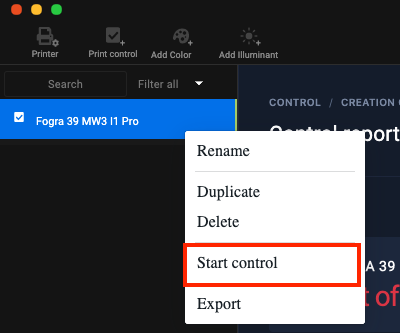
<span class="text-4505230f--TextH400-3033861f--textContentFamily-49a318e1"><span data-key="a817366cd555477aa06c8cfdc39c52bc">To start successive measurements, right-click on the " **Print Control** " file, then select " **Start control** "</span></span>

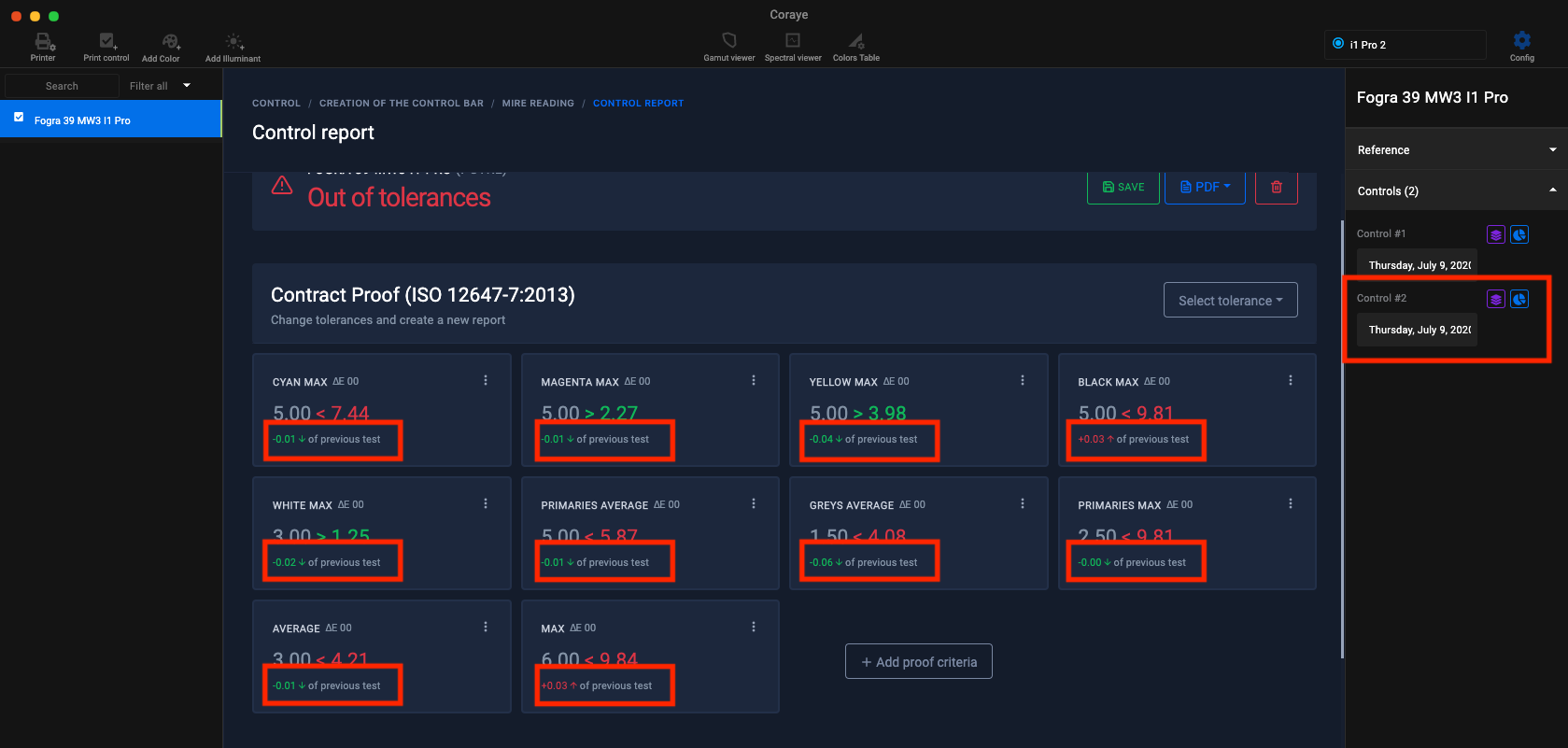
<div id="bkmrk--32"><div><div><div data-editioncontainer="true"><div data-gramm="false" data-key="d26c8eb39f0a4146a8ae76dfc2c4ae5f" data-slate-editor="true"><div data-key="5ea3abaf1dae40da8554042f37e508de" data-slate-void="true"><div>[![Start Control PC.png](https://wiki.coraye.com/uploads/images/gallery/2021-09/scaled-1680-/start-control-pc.png)](https://wiki.coraye.com/uploads/images/gallery/2021-09/start-control-pc.png)</div></div></div></div></div></div></div><span class="text-4505230f--TextH400-3033861f--textContentFamily-49a318e1"><span data-key="b1b47c66845c4bc6937d62c0a652fd4a">The second measurement will be added to the history of the " **Print Control** " file. Information to quantify the difference with the previous measurement will be added in each of the blocks.</span></span>

<div id="bkmrk--33"><div><div><div data-editioncontainer="true"><div data-gramm="false" data-key="d26c8eb39f0a4146a8ae76dfc2c4ae5f" data-slate-editor="true"><div data-key="0e172bc65fcb492d8b48ddd735454546" data-slate-void="true"><div>[![Difference with report prec.png](https://wiki.coraye.com/uploads/images/gallery/2021-09/scaled-1680-/difference-avec-rapport-prec.png)](https://wiki.coraye.com/uploads/images/gallery/2021-09/difference-avec-rapport-prec.png)</div></div></div></div></div></div></div><span class="text-4505230f--TextH400-3033861f--textContentFamily-49a318e1"><span data-key="fc9b7104baea4da1bcebb757011bb649">The history of reports can be viewed by clicking on the blue icon. It is possible to transform the measured values into a color table by clicking on the purple icon.</span></span>

<div id="bkmrk--34"><div><div><div data-editioncontainer="true"><div data-gramm="false" data-key="d26c8eb39f0a4146a8ae76dfc2c4ae5f" data-slate-editor="true"><div data-key="c35348e47a4a459bbdd74f9d78d389ac" data-slate-void="true"><div>[![Historic Control.png](https://wiki.coraye.com/uploads/images/gallery/2021-09/scaled-1680-/historic-control.png)](https://wiki.coraye.com/uploads/images/gallery/2021-09/historic-control.png)</div></div></div></div></div></div></div><div id="bkmrk--35"></div>#### Trend curves

From version 1.23.0, an evolution curve is displayed under each parameter to monitor the evolution of your prints.

<div id="bkmrk--36">[![image-1637059138527.png](https://wiki.coraye.com/uploads/images/gallery/2021-11/scaled-1680-/image-1637059138527.png)](https://wiki.coraye.com/uploads/images/gallery/2021-11/image-1637059138527.png)</div>#### <span class="text-4505230f--HeadingH600-23f228db--textContentFamily-49a318e1"><span data-key="1b240b45a9074ae5a0dbcf5437fc8c6c">3D display of measurements from the Mediawedge range</span></span><svg class="icon-7f6730be--text-3f89f380" fill="none" height="1em" preserveaspectratio="xMidYMid meet" stroke="currentColor" stroke-linecap="round" stroke-linejoin="round" stroke-width="2" viewbox="0 0 24 24" width="1em" xmlns="http://www.w3.org/2000/svg"></svg>

<span class="text-4505230f--TextH400-3033861f--textContentFamily-49a318e1"><span data-key="fadbc25e44e446a280a0ff0b7dc95137">The color table generated in the previous step can be displayed in the Gamut Viewer to view the measurement deviations in 3D or to compare the measurements with the reference profile for example.</span></span>

<div id="bkmrk--37"><div><div><div data-editioncontainer="true"><div data-gramm="false" data-key="d26c8eb39f0a4146a8ae76dfc2c4ae5f" data-slate-editor="true"><div data-key="f065e57666de4c6baea9a476b7321000" data-slate-void="true"><div>[![Gamut Viewer PC.png](https://wiki.coraye.com/uploads/images/gallery/2021-09/scaled-1680-/gamut-viewer-pc.png)](https://wiki.coraye.com/uploads/images/gallery/2021-09/gamut-viewer-pc.png)</div></div></div></div></div></div></div>#### <span class="text-4505230f--HeadingH600-23f228db--textContentFamily-49a318e1"><span data-key="1d0e67dff0484bfca55c9c065bd358f7">Saving measurements</span></span><svg class="icon-7f6730be--text-3f89f380" fill="none" height="1em" preserveaspectratio="xMidYMid meet" stroke="currentColor" stroke-linecap="round" stroke-linejoin="round" stroke-width="2" viewbox="0 0 24 24" width="1em" xmlns="http://www.w3.org/2000/svg"></svg>

<span class="text-4505230f--TextH400-3033861f--textContentFamily-49a318e1"><span data-key="cbbea7a6a61345f6b9dd4ca2bd078da1">Saving the " **Print Control** " file is simply done by right-clicking on the file, then selecting the " **Export** " function.</span></span>

<div id="bkmrk--38"><div data-editioncontainer="true"><div data-gramm="false" data-key="d26c8eb39f0a4146a8ae76dfc2c4ae5f" data-slate-editor="true"><div data-key="c97020636cb144e985f975da5dee430e" data-slate-void="true">[![Export pctrl.png](https://wiki.coraye.com/uploads/images/gallery/2021-09/scaled-1680-/export-pctrl.png)](https://wiki.coraye.com/uploads/images/gallery/2021-09/export-pctrl.png)</div></div></div></div>